
TL;DR
Key Takeaways
- Lumbar support while driving should gently fill the natural inward curve of the lower back. It should provide even contact without creating strong pressure or pushing the body forward.
- The driver should sit fully back in the car seat. The buttocks and shoulders should stay against the seatback so the lumbar support can work from a stable position.
- Lumbar support works as part of the whole driving position. Seatback angle, seat height, pedal distance, pelvic position, and full seatback contact all affect how the support feels and works.
- More lumbar pressure is not always better. Too much support can push the torso forward and change pedal or steering-wheel reach.
- Built-in lumbar support should be adjusted gradually for gentle contact rather than maximum firmness or projection.
- An external lumbar roll or cushion may help when the car has no built-in support or the existing support leaves a gap behind the lower back. It should still allow full contact with the seatback.
- Long drives still require movement breaks. Correct lumbar support does not remove the effects of sitting in one position for an extended period.
- Persistent pain, pain that travels into a leg, numbness, weakness, or symptoms after an accident or significant injury need medical attention rather than repeated seat adjustments.
Quick Answer
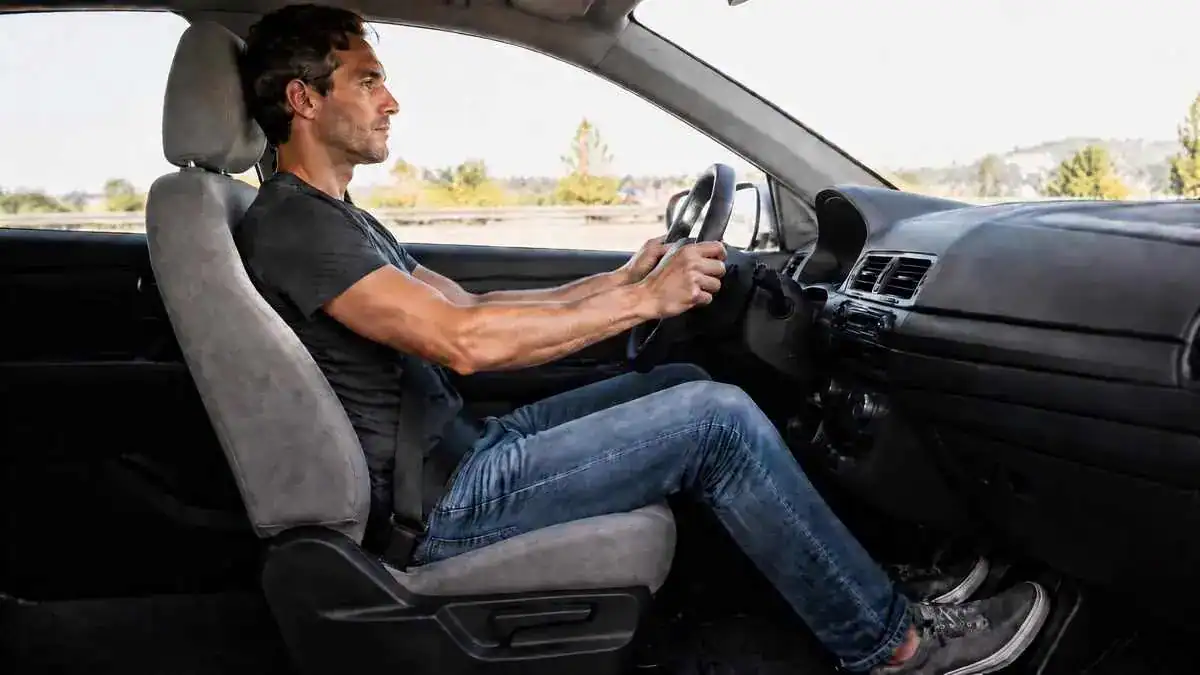
For lumbar support while driving, the driver should sit fully back against the seat and let the support gently meet the natural inward curve of the lower back. The support should create even contact without leaving a hollow gap or pushing the torso forward.
A seatback angle of about 100–110° is a useful starting reference. The hips should stay level with or slightly above the knees. Pedal distance should keep the legs from becoming nearly straight or feeling cramped.
Lumbar support should work with the whole driving position. Seat height, pedal distance, pelvic position, and full seatback contact can all change how the support fits the lower back.
After changing the lumbar support, the driver should also recheck steering-wheel reach. The shoulders should remain supported by the seatback, with a slight bend in the elbows rather than a forward reach.
No single lumbar setting works for every driver. A suitable setup provides gentle, comfortable support while allowing the driver to stay fully against the seat and reach the pedals and steering wheel without strain.
Table of Contents
When to Worry
Mild discomfort linked to lumbar support while driving may improve after movement or a better seat setup. Pain that persists, spreads, becomes intense, or occurs with neurological symptoms needs more attention than repeated lumbar or seat adjustments.
Pain That Does Not Improve
Professional medical evaluation may be appropriate when back pain lasts longer than about one week without improvement. Constant or intense pain, pain that gets worse at night, or discomfort that continues despite correcting the seat and lumbar support also deserves attention.
Persistent one-sided symptoms should not automatically be treated as ordinary driving discomfort. Symptoms that continue beyond three months also fall into the chronic-duration range.
Pain That Travels Into the Leg
Pain that spreads into one or both legs is more concerning than ordinary stiffness after driving. This is especially important when the pain extends below the knee or occurs with numbness, tingling, or weakness.
These symptoms should not be assumed to come from poor lumbar support or driving posture alone. Medical evaluation is more appropriate than repeatedly changing the car-seat setup.
Weakness or Loss of Control
Progressive leg weakness, foot drop, or repeated tripping requires prompt medical attention. Saddle-area numbness or new loss of bladder or bowel control requires urgent medical assessment.
These warning signs are different from common posture-related soreness. They should not be managed as a simple lumbar-support or seat-position problem.
Pain After an Accident or Injury
Back pain that begins after a car accident, fall, or other significant trauma needs medical attention rather than continued ergonomic adjustment. Back pain with fever is another warning sign.
Pain that becomes worse with rest also deserves medical evaluation. In general, temporary soreness that improves with movement or seat adjustment is more consistent with an ergonomic pattern. Persistent, progressive, radiating, neurological, or trauma-related symptoms are more concerning.
Seat adjustment alone should not be relied on when any of these warning signs are present:
- Pain that travels into one or both legs
- Numbness or tingling
- Progressive weakness
- Foot drop or repeated tripping
- Saddle-area numbness
- New bladder or bowel control problems
- Back pain after a significant accident, fall, or other trauma
- Back pain with fever
- Persistent or worsening symptoms
Symptoms / Signs
Changes linked with lumbar support while driving can appear as stiffness, posture drift, uneven back contact, pressure, or repeated movement in the seat. These signs describe what the driver may notice during or after a drive without explaining the cause yet.
Stiffness After a Long Drive
Stiffness may become noticeable after prolonged driving. The lower back may ache after sitting for an extended period, or discomfort may become clearer when the driver stands after leaving the car.
Several driving-related factors can contribute to lower back pain after driving, including prolonged sitting, limited movement, and the overall driving position.
Short-lived stiffness after a drive is different from discomfort that persists or keeps getting worse. Mild stiffness may settle within about 24–48 hours, while symptoms that continue or worsen may need closer attention.
The Lower Back Starts to Round
The lower back may gradually round against the car seat as the drive continues. The driver may also begin to slouch even if the sitting posture felt stable at the start.
This gradual change is an observable sign of posture drift during longer periods of driving.
A Hollow Feeling Behind the Lower Back
A driver may notice a hollow feeling between the lumbar region and the seat. The lower back may seem to sit against an empty space instead of making even contact with the seatback.
The gap itself is the important sign here. It shows that the lower back is not making even contact with the seatback.
Pressure or Pushing in the Lower Back
Another sign is strong or concentrated pressure in the lumbar region. Instead of feeling evenly supported, one area of the lower back may feel as though the support is pressing into it.
The driver may also feel pushed forward and find it harder to stay naturally against the seatback. The support may simply feel too prominent during the drive.
Frequent Shifting or Fidgeting
The driver may keep shifting position, moving the hips or torso, or making small adjustments to stay comfortable.
During longer drives, the driver may struggle to find a position that feels stable for more than a short time. Frequent fidgeting can therefore be a useful comfort signal to notice rather than ignore.
Shoulder or Neck Tension
Shoulder tension may appear when the driver has to reach toward the steering wheel. Neck tightness or a forward-head posture may also become noticeable during the drive.
These changes can be signs that the driver is no longer sitting in the same supported position.
The Rearview Mirror No Longer Lines Up
The rearview mirror can provide a simple visual clue. If it is set while the driver is sitting in the intended position, it should line up with that posture.
If the mirror later seems too high, too low, or otherwise “off,” the driver’s position may have changed. It can be a simple sign that the driver has started to slump or drift away from the original posture.
Causes: Why Lumbar Support While Driving May Feel Wrong
Several factors can make lumbar support while driving feel ineffective or uncomfortable. The problem may come from how sitting changes the lower back, how the car seat is positioned, or how the support contacts the body.
Sitting Flattens the Lower-Back Curve
Sitting can rotate the pelvis backward. This posterior pelvic tilt reduces the natural inward curve of the lower back, also called lumbar lordosis.
The basic pattern is:
Sitting → posterior pelvic rotation → reduced lumbar curve → altered spinal loading
Research shows that lumbar lordosis decreases during sitting compared with standing. A poorly supported car seat may allow this flattened posture to become more noticeable.
Understanding how lumbar support works can help explain why supporting this natural lower-back curve matters while driving.
The Seat Is Too Far From the Pedals
When the driver’s seat is too far from the pedals, the legs may become nearly straight. This position can pull the pelvis backward and flatten the lower-back curve.
The pattern is:
Seat too far away → legs straighten → pelvis pulled backward → lumbar curve decreases → lumbar support loses effect → discomfort may return
This means pedal distance can affect how well the lumbar support works, even when the support itself has not changed.
The Seatback Is Too Upright
A rigid 90° sitting position is not automatically the best driving posture. Sitting bolt upright can increase spinal-disc pressure rather than spreading the load comfortably.
For this reason, a posture that looks very upright should not automatically be treated as the ideal ergonomic position.
The Seatback Is Too Reclined
Reclining the seatback too far can create a different problem. The driver still needs to look ahead at the road, so the head may move forward even while the torso stays reclined.
The pattern is:
Excessive recline → head moves forward to see the road → neck and shoulder strain → upper-back discomfort
This can make the overall driving position uncomfortable even when the lower back has support.
Lumbar Support Is Too Strong
More lumbar support is not automatically better. Excessive prominence can push the torso forward instead of gently supporting the natural lower-back curve.
As the torso moves forward, pedal and steering-wheel reach can also change. The driver may then need to stretch farther or change position to control the vehicle.
Lumbar Support Does Not Match the Lower Back
Lumbar support may also feel wrong when it does not match the driver’s lower-back shape. Too little contact can leave an unsupported gap between the lumbar region and the car seat.
A fixed or non-adjustable support can create the opposite problem. If its shape or position does not fit the driver, it may create concentrated pressure points instead of broad, even support.
Long Drives Limit Movement
Long drives keep the body in a static sitting position for extended periods. The hips remain flexed, and prolonged hip flexion can contribute to hip-flexor tightening.
The pattern is:
Prolonged sitting → prolonged hip flexion → hip-flexor tightening → altered pelvic position → lower-back stiffness
These same effects can also help explain back pain from sitting too long outside the driving setting. This is why lumbar support cannot remove every effect of prolonged sitting.
Back-Pocket Items Tilt the Pelvis
A wallet, phone, or other item in a back pocket can raise one side of the pelvis. This creates an uneven sitting surface and can change how the lower back contacts the seat.
The pattern is:
Wallet or phone → lateral pelvic tilt → uneven lumbar loading → one-sided discomfort
Even a suitable lumbar-support setup may feel uneven when an object under one side tilts the pelvis.
What It May Indicate
Patterns noticed with lumbar support while driving can help show whether the support or the overall driving position needs attention. These signs can help a driver decide whether the setup needs another look, but they do not always explain why back pain is happening.
The Support May Not Be Making Even Contact
A hollow feeling behind the lower back may mean the lumbar region is not making enough contact with the seat. An unsupported gap can leave part of the natural lumbar curve without support.
Contact can also be uneven in the opposite way. If one small area feels strongly pressed while the rest of the lower back feels unsupported, the lumbar support may be creating a concentrated pressure point instead of broad, even contact.
The Support May Be Too Prominent
Lumbar support that feels forceful or pushes the torso forward may be too prominent. The goal is to fill the lower-back curve gently, not force the spine into a different position.
A change in reach can provide another clue. If the pedals or steering wheel suddenly feel farther away after the lumbar support is increased, the support may have moved the driver’s torso too far forward.
The Driving Position May Be Working Against the Support
Lumbar support should not be assessed in isolation. Its fit can change with the seatback angle, seat height, pedal distance, pelvic position, and the driver’s contact with the seatback.
For example, a position that changes pelvic alignment or prevents the body from staying fully against the seat can also change how the lumbar support contacts the lower back. Suitable support may then feel ineffective even when the lumbar setting itself is not the only issue.
Posture May Be Drifting During the Drive
Gradual slouching can indicate that the driver’s posture has changed from the position used at the start of the drive. Frequent fidgeting or repeated position changes may provide another clue that a stable sitting position is not being maintained.
The rearview mirror can provide simple visual feedback. If it was set from the intended posture but later seems misaligned, the driver may have slumped or shifted position. Shoulders moving away from the seatback can also signal a change in the original driving position.
The Discomfort May Be More Than a Setup Issue
Diffuse soreness that improves with movement or after correcting the seat or lumbar support is more consistent with an ergonomic or mechanical pattern. Temporary discomfort is also different from symptoms that continue or become progressively worse.
Radiating pain, numbness, tingling, weakness, or persistent and progressive symptoms are more concerning. These patterns should not automatically be blamed on lower back support while driving or managed only by making further seat adjustments.
These common patterns can help show which part of the driving setup may deserve a closer look:
| Sign | What It May Suggest |
| Hollow feeling behind the lower back | Too little lumbar contact |
| Strong pressure in one spot | Support may be too prominent or mismatched |
| Torso pushed forward | Too much lumbar depth |
| Frequent fidgeting | Setup may not remain comfortable |
| Shoulders leave the seatback | Steering reach or support depth may need review |
| Mirror seems misaligned later | Posture may have drifted |
| Discomfort improves after adjustment | More consistent with an ergonomic or mechanical pattern |
What to Do
The best way to set up lumbar support while driving is to adjust the whole driving position in a logical order. The driver should first establish a stable seat position, then fine-tune the lumbar support, pedal reach, and steering-wheel reach so they work together.
Step-by-Step Driving Lumbar Setup
A practical setup can follow this order while the vehicle is safely stopped:
- Sit fully back in the seat.
- Set the seatback angle.
- Set the seat height.
- Check the distance from the pedals.
- Position the lumbar support against the natural lower-back curve.
- Adjust the support depth gradually.
- Recheck steering-wheel reach.
- Remove items from back pockets.
- Recheck comfort and posture during longer drives.
Start With the Driver Fully Back in the Seat
The driver should slide the hips fully back into the seat before changing the lumbar support. The buttocks should stay against the seatback, while the shoulders remain supported.
This creates stable pelvic contact. Without that base position, later lumbar adjustments may feel different each time the body shifts.
Set the Seatback Before Fine-Tuning Lumbar Support
A seatback angle of about 100–110° is a useful starting reference. This provides a middle ground between a rigid 90° position and a deeply reclined seat.
This range is not a universal prescription. The driver may need small changes based on body size, car-seat shape, and comfort.
Set the Seat Height
Seat height should allow the hips to sit level with or slightly above the knees. Hips that sit much lower than the knees can change pelvic position and make the lower-back setup harder to maintain.
The goal is a stable sitting position that works with the lumbar support rather than against it.
Check the Distance From the Pedals
The driver should be close enough to the pedals that the legs do not become nearly straight. At the same time, the seat should not be so close that the hips feel cramped.
Pedal distance should allow safe, usable control without forcing the pelvis into an awkward position.
Set Lumbar Support While Driving for Gentle Contact
Lumbar support for driving should be adjusted while the vehicle is safely stopped. The support should meet the natural inward curve of the lower back. For more detailed positioning, where lumbar support should sit depends on matching the support to the lower-back curve, with its lowest edge around belt-line height near the top of the pelvis..
The contact should feel gentle and even. There should not be a hollow gap behind the lower back, but the support should not push the torso aggressively forward.
Adjust the Depth Gradually
Lumbar depth should be increased little by little until the lower-back curve feels supported. The driver should stop increasing the support before the torso begins to move forward.
Maximum firmness is not the goal. Moderate support that matches the driver’s shape is more useful than simply using the strongest setting available.
Recheck Steering-Wheel Reach
After changing lumbar depth, the driver should recheck the steering wheel. The elbows should remain slightly bent, and the shoulders should stay supported by the seatback rather than moving forward to reach.
This check is especially important after adding an external lumbar cushion because extra thickness can move the torso forward and change steering-wheel reach.
Before moving on, these main setup checks should work together:
| Setup Area | Useful Starting Point | Why It Matters |
| Lumbar contact | Natural lower-back curve | Supports even contact |
| Seatback angle | About 100–110° | Helps balance support and recline |
| Seat height | Hips level with or slightly above knees | Helps pelvic positioning |
| Steering-wheel reach | Slight elbow bend | Reduces reaching |
| Pedal distance | Legs not straight or cramped | Helps preserve pelvic position |
Remove Items From Back Pockets
A wallet, phone, or other bulky item should be removed from a back pocket before driving. Anything that raises one side of the pelvis can create an uneven sitting surface.
Removing these items helps the pelvis stay more level against the seat and gives the lumbar support a more consistent position to work against.
Recheck the Setup During Longer Drives
The driver should pay attention to patterns that return during longer drives. Repeated discomfort, frequent fidgeting, or the same pressure appearing at a similar point in each drive can signal that the setup needs another review.
The rearview mirror can also act as a simple posture cue. If it no longer lines up as it did at the start of the drive, the driver’s posture may have shifted or slumped.
Ergonomic & Support Options
The right choice of lumbar support for car seats depends on how well the seat fits the driver and how the support works with the rest of the driving position. Different types of lumbar support, including built-in support, an external cushion, or a simple rolled towel, may be useful in different situations.
Built-In Car Lumbar Support
Built-in lumbar support should be adjusted for placement and depth when the vehicle controls allow it. The goal is gentle contact with the natural lower-back curve rather than maximum firmness or projection.
No single setting works for every driver. Body shape, seat design, and preferred support depth can all affect what feels comfortable.
External Lumbar Roll or Cushion
An external lumbar roll or cushion may provide lower back support while driving when the vehicle has no built-in adjustment, when the built-in support feels inadequate, or when an unsupported gap remains behind the lower back.
The support should stay modest in thickness. A range of about 2–4 inches can serve as a practical reference, but the driver still needs to maintain full seatback contact and comfortable reach.
After adding an external cushion, pedal reach and steering-wheel reach should be checked again. Too much thickness can move the torso forward and change the driver’s position.
The main differences between built-in and external lumbar support can be summarized this way:
| Feature | Built-In Support | External Support |
| Integration | Part of the vehicle seat | Added to the seatback |
| Adjustment | Depends on vehicle controls | Position or thickness can be changed |
| Portability | Vehicle-specific | Can move between seats |
| Main use | Fine-tune existing seat support | Add support when built-in support is absent or inadequate |
| Main caution | Too much projection | Excess thickness can change reach |
Rolled Towel as a Simple Option
A rolled towel can serve as a simple temporary form of back support while driving when the car has no suitable built-in lumbar adjustment. It can provide extra contact without requiring a separate lumbar cushion.
It should still stay thin enough to avoid pushing the driver away from the seatback.
Seatback Angle and Lumbar Support
Seatback angle affects how the pelvis, torso, and lumbar support work together. A position around 100–110° is a useful starting reference because it falls between rigid 90° sitting and deep recline.
The pelvis and torso should stay in steady contact with the seat so the lumbar support has a stable body position to support.
Seat Height and Lumbar Support
Seat height also changes the relationship between the pelvis and lower back. The hips should generally stay level with or slightly above the knees.
When the hips sit much lower than the knees, posterior pelvic tilt may become more likely. This can reduce the lower-back curve and change how the lumbar support feels.
Pedal Reach and Lumbar Support
An external lumbar cushion can move the torso forward, which may change the driver’s distance from the pedals. A cushion that is too thick can therefore affect normal leg mechanics.
Pedal reach should allow the legs to remain neither nearly straight nor excessively cramped. The support should fit the driver without forcing a worse leg position.
Steering-Wheel Reach and Lumbar Support
The steering wheel should remain within comfortable reach after lumbar support is adjusted. The elbows should stay slightly bent, and the shoulders should remain against the seatback rather than moving forward to steer.
Movement Still Matters on Long Drives
Lumbar support does not remove the effects of prolonged static sitting. Even with good back support while driving, the body still benefits from changing position and moving during longer trips.
Understanding how lumbar support affects posture can also help explain why support does not replace regular movement.
A short walk about every 45–60 minutes can serve as a practical movement-break reference during long drives. Movement should complement lumbar support rather than be replaced by it.
FAQ
How to Use Lumbar Support in a Car?
For lumbar support while driving, the driver should sit fully back in the seat and let the support gently meet the natural inward curve of the lower back. It should provide even contact without leaving a gap or pushing the torso forward.
How to Adjust Lumbar Support in a Car?
Built-in lumbar support should be adjusted gradually for placement and depth. The driver should use enough support to fill the lower-back curve, but not so much that it pushes the torso forward or changes normal wheel and pedal reach.
Is Lumbar Support Good for Driving?
Lumbar support may help maintain the natural lower-back curve during driving. How well it works depends on the driver’s body shape, seat design, support depth, and overall driving position.
It is not equally comfortable for every driver. Moderate, adjustable support may work better than support that is fixed or overly aggressive.
Should Lumbar Support Be Used in a Car?
Lumbar support may be useful when the car seat does not provide enough contact with the lower back. Built-in support can be adjusted when available, while a small external roll or cushion may help when built-in support is missing or inadequate.
The support should still allow the driver to remain fully against the seatback and reach the pedals and steering wheel comfortably.
How Often Should Someone Take Breaks on a Long Drive?
A short movement break about every 45–60 minutes can serve as a practical reference during longer drives. Getting out and walking briefly can help break up prolonged static sitting.
Why Does the Lower Back Hurt While Driving?
Lower-back discomfort while driving can be linked with sitting posture, a reduced lumbar curve, prolonged static sitting, or poor contact between the lower back and the seat.
The exact reason can vary, so persistent or concerning symptoms should not automatically be blamed on the car seat or lumbar support.
Why Does the Back Hurt After Driving?
Back discomfort after driving may be linked with prolonged sitting, stiffness, reduced movement, hip-flexor tightness, or posture fatigue. These effects may become more noticeable when the driver stands after leaving the car.
Can Driving Cause Lower-Back Pain?
Driving can contribute to lower-back discomfort in some people, especially during long periods of static sitting or when the seat does not support the lower back well. This does not mean driving causes pain for everyone.
How Far Should the Driver Be From the Steering Wheel?
The driver should be close enough to keep a slight bend in the elbows while the shoulders remain supported by the seatback. About 10–12 inches from the chest can serve as a general reference, while proper airbag clearance should also be maintained.
How Should Driver Seat Height Be Adjusted?
Seat height should generally keep the hips level with or slightly above the knees. This helps support a more stable pelvic position while the driver sits against the seatback.
Sources & References
- Correct Sitting Posture: Driving – Physio Med
- Ergonomic Guide to Driver Seat Fitting – University of Washington
- Driving and Ergonomics – CCOHS
- Spine Posture and Discomfort During Prolonged Simulated Driving With Self-Selected Lumbar Support Prominence – PubMed
- Vehicle Ergonomics – Oregon State University
- Sagittal Lumbar and Pelvic Alignment in the Standing and Sitting Positions – PubMed
- The Effect of Standing and Different Sitting Positions on Lumbar Lordosis – PMC
- Back Pain: When to See a Doctor – Mayo Clinic
Related Articles
For more help with lumbar support, these guides explain where it should sit, how it works, and how different types of support compare.
- Where Should Lumbar Support Be? How to Position and Adjust It – A useful next step for learning more about general lumbar placement, height, depth, and adjustment.
- What Is Lumbar Support? How It Works and Why It Matters – Explains the basic purpose of lumbar support and how it supports the natural lower-back curve.
- Types of Lumbar Support: How Different Support Options Compare – Compares built-in, external, and other lumbar-support options for readers who want to understand the main support types.
Update Note
Last Reviewed / Updated
Last reviewed: August 26, 2026
Research and driving-ergonomics guidance related to lumbar support while driving should be reviewed periodically. This article should be updated when the evidence, ergonomic recommendations, or cited guidance meaningfully changes.
8 thoughts on “Lumbar Support While Driving: How to Set It Up for a Comfortable Driving Position”
Comments are closed.