
TL;DR
Key Takeaways
- Gaming chairs and office chairs have different design priorities, but their features can overlap. Gaming chairs often focus on racing-style looks and deep recline, while office chairs commonly focus on desk work and adjustable fit.
- A racing-style seat, tall backrest, or deep recline does not automatically provide better ergonomic support or sitting comfort.
- Chair dimensions, seat shape, lumbar support, usable adjustments, and workstation compatibility matter more than the chair label.
- Both chair types can work for gaming, office tasks, or mixed use when their features match the person’s body and intended activities.
- Regular movement and position changes remain important. Neither chair type can guarantee better posture or prevent sitting discomfort.
Quick Answer
Gaming Chair vs Office Chair: Which Should a Person Choose?
In a gaming chair vs office chair comparison, office chairs often focus on adjustable fit and desk work, while gaming chairs commonly feature racing-style designs, tall backrests, and deeper recline. However, individual models vary, and neither chair type guarantees better comfort or ergonomic support.
A suitable chair should match the person’s body dimensions, offer useful adjustments, allow comfortable position changes, and support the intended tasks and workstation—not simply carry a gaming or office chair label.
Table of Contents
When to Worry
When comparing a gaming chair vs office chair, sitting comfort matters. Mild pressure or stiffness may relate to chair fit or sitting habits. However, repeated or worsening discomfort should not be ignored or automatically blamed on the chair.
When Chair Discomfort Needs Attention
Occasional stiffness may improve after changing position or taking a short movement break.
However, the following patterns deserve closer attention:
- Pressure, stiffness, or discomfort that repeatedly develops during sitting.
- Symptoms that continue despite reasonable chair adjustments and movement breaks.
- Pain that increasingly affects normal desk work, gaming, or other daily activities.
When Professional Evaluation May Be Needed
A healthcare professional can help assess symptoms that do not follow a simple sitting-related pattern.
Medical evaluation may be appropriate when:
- Pain persists, keeps returning, or gradually worsens.
- Pain spreads into an arm or leg.
- Numbness, tingling, or weakness occurs repeatedly.
- Stiffness or discomfort causes noticeable changes in normal movement.
These symptoms may involve factors beyond chair design or ergonomic setup.
When Urgent Medical Attention May Be Needed
Some warning signs require urgent medical care rather than further chair adjustments.
These include:
- New difficulty controlling or passing urine or stool.
- Loss of feeling around the groin, buttocks, or inner thighs (saddle numbness).
- New or worsening leg weakness, especially when both legs are affected.
- Severe back pain following significant trauma, such as a hard fall or vehicle accident.
These warning signs should never be assumed to result from a gaming chair, office chair, or poor sitting posture.
Symptoms and Signs of Poor Chair Fit
Poor chair fit may become noticeable through pressure, awkward sitting positions, or discomfort during normal use. These signs can appear in either gaming or office chairs and may become more noticeable during longer work or gaming sessions.
Pressure Around the Hips and Thighs
A chair may feel restrictive when the seat edges press against the hips or outer thighs. Some people may notice concentrated pressure beneath the buttocks or discomfort along the backs of the thighs.
Raised side bolsters may also feel tight against the legs. Repeatedly shifting to escape pressure is another noticeable sign.
Difficulty Sitting Against the Backrest
Some people struggle to sit fully against the backrest while keeping their legs in a comfortable position.
Common signs include sliding forward, perching near the front of the seat, or repeatedly moving away from the backrest. The person may also find it difficult to maintain comfortable backrest contact during normal desk activities.
Lower-Back Pressure or Poor Support Contact
Lower-back discomfort may appear as a firm pressure point where a lumbar pillow or backrest meets the body.
In other cases, a noticeable gap remains between the lower back and the chair. Some people repeatedly shift their hips or upper body because the support contact feels uneven or uncomfortable.
Shoulder and Arm Discomfort
Poor chair fit may also become noticeable around the shoulders, arms, and neck.
The shoulders may stay raised while typing, or the forearms may feel unsupported during keyboard, mouse, or controller use. Some people struggle to rest their arms comfortably without leaning or changing their upper-body position.
Stiffness During Longer Sitting Sessions
A chair may feel comfortable at first, but stiffness or muscle fatigue can build during prolonged sitting. The lower back, hips, neck, or shoulders may gradually feel tight or tired. Repeated fidgeting, frequent position changes, or difficulty moving freely within the seat may also become noticeable.
The following checklist summarizes common signs of a possible chair-fit concern.
Signs a Chair May Not Fit
- The seat edges press against the hips or thighs.
- The person repeatedly slides forward or struggles to sit against the backrest.
- A lumbar pillow or backrest creates an uncomfortable lower-back pressure point.
- The shoulders remain raised during normal desk activities.
- The forearms feel unsupported while using the keyboard, mouse, or controller.
- Stiffness gradually builds during longer sitting sessions.
- The seat feels restrictive when the person tries to change position.
These signs may point to a fit or setup concern, but they do not establish the cause of pain.
What Causes Gaming Chair vs Office Chair Differences?
The main differences in a gaming chair vs office chair comparison come from design priorities, seat construction, support features, and intended use.
Gaming chairs often emphasize racing-inspired styling and relaxation features, while office chairs commonly focus on adjustable fit during desk work.
However, these are common design tendencies, not fixed rules. Individual models vary, and both chair types can share many ergonomic features.
Gaming Chair vs Office Chair at a Glance
| Chair Feature | Typical Gaming Chair | Typical Office Chair | What to Check |
| Design | Racing-inspired styling | Task-oriented design | Appearance does not establish ergonomic quality |
| Seat shape | Sculpted seat, sometimes with raised side bolsters | Often has a more open seat pan | Usable space and freedom to move |
| Lumbar support | Removable pillow or integrated system | Contoured or adjustable support | Comfortable lower-back contact |
| Adjustments | Vary by model | Often designed around desk-work fit | Whether the adjustment range suits the person |
| Armrests | Fixed or adjustable, depending on model | Fixed or adjustable, depending on model | Comfortable arm positioning during intended tasks |
| Recline | Often emphasizes deeper recline | Often emphasizes controlled recline | Support during work, gaming, and position changes |
| Upholstery | Commonly foam with synthetic leather or fabric | Commonly mesh, fabric, or padded upholstery | Temperature and surface comfort |
| Price and value | May emphasize styling and gaming features | May emphasize task-related adjustments | Useful features, construction, and actual fit |
Design and Intended Use
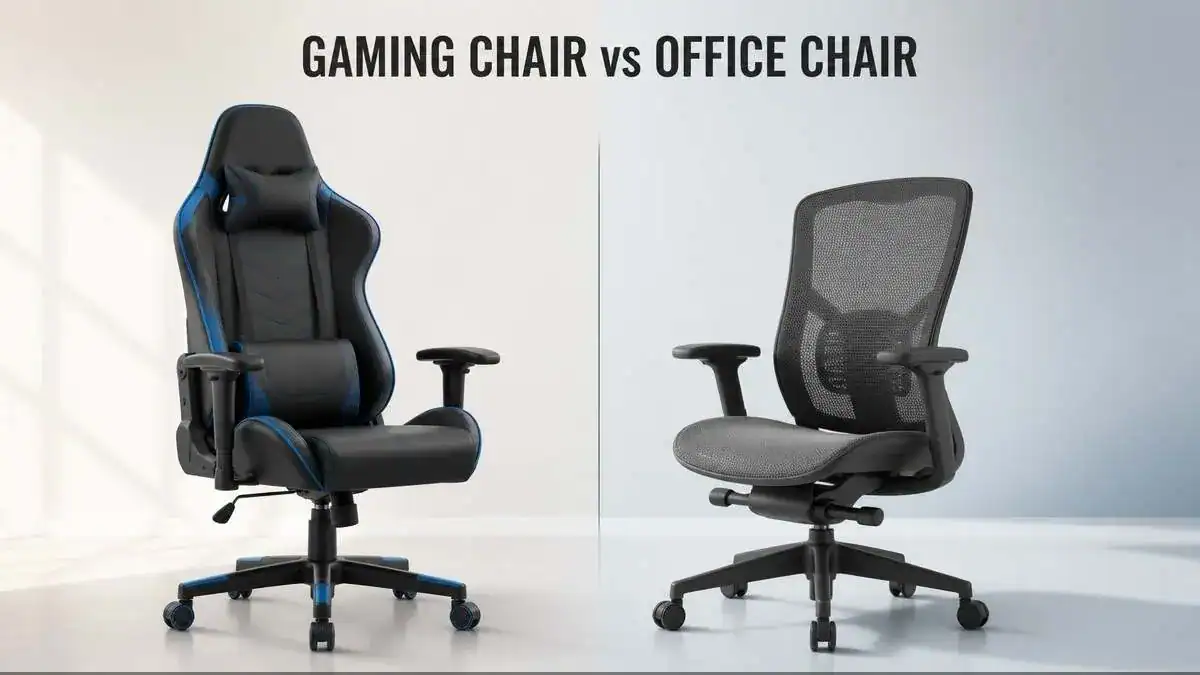
Gaming chairs commonly use a racing-inspired design. Many feature tall backrests, bold colors, visible stitching, and a sculpted seat. Some also include headrest pillows and a deeper recline range.
Office chairs usually have a more task-oriented design. Their features often focus on supporting seated computer work through adjustable dimensions, backrest support, and movement controls.
However, intended use does not create a strict boundary between the two categories. A gaming chair may work for office tasks, while an office chair may also suit gaming sessions.
The main distinction is the design approach, not a guaranteed difference in ergonomic quality. A racing-style appearance, tall backrest, or professional-looking frame does not prove that a chair fits the person using it.
Seat Shape and Side Bolsters
Seat shape is one of the more noticeable differences between gaming and office chairs.
Many racing-style gaming chairs use a sculpted or bucket-style seat with raised edges. These side bolsters create a more enclosed sitting area, although their height and firmness vary between models.
Office task chairs more commonly use an open seat pan. This design may provide greater freedom for natural leg positioning and small sitting adjustments. The important difference is usable seat width, not just the chair’s advertised width.
For example, raised side bolsters can reduce the space available for the hips and thighs, even when the overall seat appears wide. Firm edges may also create concentrated pressure when they contact the legs.
An open seat does not automatically guarantee comfort either. Its width, shape, and cushioning still need to match the person’s body. Both designs should provide enough space for comfortable sitting without unnecessarily restricting position changes.
Backrest and Lumbar Support
Gaming and office chairs may use different approaches to lower-back support. Some gaming chairs include removable lumbar pillows. Others use built-in support systems that adjust within the backrest. The support may feel different depending on its shape, firmness, and placement.
Office chairs commonly use contoured backrests, built-in lumbar curves, or adjustable lumbar features. Some models allow the support position or depth to change, while others have a fixed design.
However, neither approach is automatically better. A removable pillow may provide useful contact for one person but feel too thick or poorly positioned for another. Likewise, an integrated lumbar system may offer adjustments without matching every person’s lower-back shape.
The important factor is how the support contacts the body during normal sitting. Lumbar support and seat cushioning also serve different purposes. A soft seat does not replace useful backrest contact, and a prominent lumbar feature does not guarantee comfortable support.
Seat Height and Depth Adjustment
The available adjustment range can affect how well either chair type fits different body sizes and workstations. Gaming and office chairs commonly include seat-height adjustment. However, their minimum and maximum heights vary by model.
Seat-depth adjustment is another important distinction. Some office task chairs offer a sliding seat pan, while many racing-style gaming chairs use a fixed seat depth. This is not universal, as individual products may offer different adjustment systems.
A suitable range matters because the chair must accommodate the person’s legs while allowing useful backrest contact. A chair with several controls may still provide a poor fit when those controls cannot reach the positions a person needs.
For this reason, adjustment usefulness matters more than simply counting adjustable features.
Armrest Design and Adjustability
Both gaming and office chairs may include fixed or adjustable armrests. The main differences lie in their adjustment range, shape, and intended use.
Some gaming chairs offer multi-directional armrests that move up, down, forward, backward, inward, or outward. Office task chairs may offer similar controls, although the available options vary widely.
These adjustments can affect how comfortably a person positions the arms during different activities.
For example:
- Keyboard use: Armrest height and spacing may affect how the forearms rest near the desk.
- Mouse use: Armrest position may influence available movement space.
- Controller use: Armrest width and placement may affect how comfortably the elbows rest.
- Mixed use: A wider adjustment range may help accommodate different arm positions throughout the day.
However, more adjustment directions do not automatically mean better support. Armrests also need to work with the desk. A design that feels comfortable away from the workstation may become restrictive when the chair moves closer to the work surface.
Recline and Movement
Recline is another common difference between gaming and office chair designs. Many gaming chairs emphasize deep backrest recline, sometimes allowing a person to lean far backward for relaxation between activities.
Office task chairs often focus on controlled recline during seated computer work. Depending on the mechanism, the backrest and seat may move together or allow different levels of supported movement.
These features serve different purposes. A deep recline range may be useful for resting, but the maximum recline angle does not establish how well a chair supports normal keyboard and mouse use.
Recline tension also matters. It controls how much resistance the chair provides when a person leans backward. Some chairs offer additional controls for limiting or locking recline positions.
A useful recline mechanism should allow comfortable, supported position changes rather than encourage one fixed sitting posture. Neither gaming nor office chairs remove the need for regular movement during prolonged sitting.
Upholstery and Breathability
Gaming chairs commonly use foam padding covered with synthetic leather or fabric. Office chairs often use mesh, fabric, foam, or a combination of materials. However, material choices overlap between both categories.
Each upholstery type can create a different sitting experience:
- Synthetic leather: Often provides a smooth, easy-to-wipe surface but may feel warmer during longer sessions.
- Mesh: Allows airflow through its open structure, although surface tension and firmness vary.
- Fabric: Offers different textures and surface friction depending on the weave and construction.
- Foam padding: Provides cushioning, but comfort depends on its thickness, density, shape, and underlying support.
Temperature and surface feel can become more noticeable during long work or gaming sessions, especially in warm environments. Some people prefer a cooler surface, while others prefer the feel of padded upholstery. Friction can also affect how easily a person makes small position changes.
Material alone does not determine ergonomic quality. A mesh chair is not automatically more supportive, and a thickly padded gaming chair is not automatically more comfortable.
Price and Practical Value
Gaming and office chairs are available across different price ranges. However, their prices may reflect different combinations of design, materials, construction, branding, and adjustable features.
A gaming chair may place greater emphasis on visual styling, upholstery, recline range, or gaming-related branding. An office chair may place greater emphasis on task-related controls, fit options, or support mechanisms.
These are general tendencies rather than fixed differences. A higher price does not guarantee better ergonomic support. Similarly, a chair with fewer visible features may still provide a suitable fit for its intended user.
Practical value depends on several factors:
- Whether the available adjustments are useful rather than merely numerous.
- Whether the seat and backrest dimensions accommodate the person’s body.
- Whether the recline and armrest mechanisms suit the intended activities.
- Whether the materials and construction meet expected daily-use needs.
- Whether the chair works comfortably with the existing workstation.
The gaming or office chair label alone provides too little information to establish value. Actual fit, usable features, and construction matter more than marketing claims.
What These Differences May Indicate
The gaming chair vs office chair comparison shows that design features alone cannot determine which chair provides better ergonomic support. Their practical value depends on how well those features match a person’s body, sitting activities, and workstation.
Several common assumptions are worth understanding before choosing between the two chair types.
A Gaming Chair Is Not Automatically Less Ergonomic
A gaming chair can include useful ergonomic features, such as adjustable armrests, lumbar support, seat-height controls, and a supportive recline mechanism. Likewise, an office chair does not automatically provide a suitable fit simply because it is marketed as ergonomic.
A well-fitting gaming chair may offer better comfort than a poorly fitting office chair, and the reverse can also be true. The important distinction is whether the available features work for the person using them.
More Recline Does Not Always Mean Better Desk Support
A chair that reclines far backward may provide a comfortable resting position. However, relaxation and active computer work place different demands on the body. Typing, using a mouse, and viewing a monitor usually require a position that allows comfortable access to the workstation.
A deeper recline angle does not automatically improve support during these activities. What matters is whether the chair allows useful position changes while keeping normal tasks within comfortable reach.
More Padding Does Not Always Mean More Comfort
Thick cushioning may make a chair feel soft during the first few minutes of sitting. However, initial softness does not always reflect comfort over a longer session. Usable seat dimensions, pressure distribution, and backrest support also matter.
For example, a heavily padded chair may still feel restrictive when its seat shape limits thigh space. Similarly, soft cushioning cannot compensate for every mismatch between the body and the chair.
Comfort depends on how the complete seating system supports the person, not simply how much padding it contains.
A Wider Adjustment Range May Help Different Users
A chair with a wider usable adjustment range may accommodate more body sizes and workstation requirements. For example, two people may need different seat heights, armrest positions, or backrest settings, even when they perform similar desk tasks.
However, adjustment count and adjustment range are not the same thing. A chair may offer several controls but still lack the dimensions needed for a particular person. A simpler model may provide a suitable fit when its available settings match the person’s needs.
The value of adjustability lies in achieving a comfortable fit rather than having the longest feature list.
Chair Comfort Does Not Depend on Category Alone
Neither gaming chairs nor office chairs can guarantee comfortable sitting for every person. Body dimensions, seat shape, support contact, intended activities, and workstation compatibility all influence the sitting experience. Individual comfort preferences also vary.
A person who works and games at the same desk may need different features from someone who mainly uses a controller away from the desk. Movement remains important in either case.
Even a well-fitting chair should allow natural position changes rather than encourage prolonged sitting in one fixed posture. Ultimately, the chair’s actual fit and everyday usefulness matter more than whether it carries a gaming or office label.
What to Do: Gaming Chair or Office Chair?
Choosing between a gaming chair or office chair depends on how the chair will be used, how well it fits the person, and whether its adjustments work with the available workstation. Rather than choosing by appearance or product category, the practical approach is to compare actual chair models against the activities they need to support.
For Regular Office Work
For regular computer work, a chair should allow comfortable access to the keyboard, mouse, monitor, and desk without forcing the person into an awkward sitting position.
An office task chair may be a useful starting point because many models offer adjustments designed around desk activities. However, a gaming chair with suitable dimensions and controls may also work.
The main features to consider include:
- A seat-height range that works with the desk and allows suitable foot support.
- Enough usable seat space for comfortable leg positioning.
- Backrest and lumbar contact that feel supportive during normal work.
- Armrests that do not interfere with keyboard or mouse access.
- A recline mechanism that allows supported movement while working.
- The chair should accommodate normal desk tasks without requiring constant leaning, reaching, or sitting away from the backrest.
For Gaming Sessions
Gaming chair selection depends partly on how a person plays. Keyboard-and-mouse gaming has many of the same workstation requirements as regular computer work. Comfortable desk access, arm positioning, and backrest contact remain important.
Controller-based gaming may involve different arm positions and greater use of recline, particularly when the screen is farther away from the chair.
In either case, the chair should provide enough room for natural posture changes. Raised side bolsters, fixed armrests, or restrictive seat shapes may feel uncomfortable when they limit the person’s preferred sitting positions.
A racing-style gaming chair is therefore an option, not a requirement. A suitable office chair may support gaming activities just as well when its features match the setup.
For Both Work and Gaming
A mixed-use chair needs to accommodate more than one activity. Someone who works at a desk during the day and games in the evening may need comfortable keyboard access, useful arm support, supported recline, and enough seat space to change positions.
Neither chair category automatically meets all these needs.
The following table shows which features may deserve attention based on the intended use.
Which Chair May Suit Different Uses?
| Main Activity | Features Worth Prioritizing | Practical Consideration |
| Regular office work | Adjustable seat height, useful backrest contact, desk-compatible armrests | Comfortable access to daily computer tasks |
| Keyboard-and-mouse gaming | Suitable desk height, arm positioning, seat freedom | Similar sitting demands to computer work |
| Controller gaming | Comfortable arm support, usable recline, position changes | Sitting position may differ from desk-based gaming |
| Mixed work and gaming | Flexible adjustments, supportive backrest, usable seat space | One chair must accommodate different activities |
| Longer seated sessions | Suitable dimensions, pressure distribution, movement freedom | Comfort should remain practical beyond the first few minutes |
The intended activity should guide the choice, but individual fit remains important in every situation.
When Comparing Two Chair Models
The most useful comparison is between two actual chair models rather than two product labels.
For example, an adjustable gaming chair and an office task chair may share several features but offer different usable dimensions or adjustment limits.
A simple comparison process can help:
- Compare seat dimensions: Check whether each model provides enough usable width and a suitable depth for the person.
- Compare adjustment ranges: Look beyond feature names and examine the available seat-height, armrest, lumbar, and recline settings.
- Compare support contact: Consider whether the backrest and lumbar features match the person’s sitting needs.
- Compare workstation use: Check whether either chair creates problems with desk access, arm positioning, or normal tasks.
- Compare practical value: Consider construction, useful features, intended daily use, and available purchase support.
A model with more advertised features is not automatically the more suitable choice. Its features must be usable for the intended person and activities.
Before Making a Purchase
A chair may look suitable in photographs or specifications but feel different during actual use.
Where possible, a person should try the chair while performing realistic sitting tasks rather than judging comfort from a brief seated test.
What to Check Before Buying
- Check whether the minimum and maximum seat-height settings suit the person and workstation.
- Confirm that the seat provides enough usable hip and thigh space.
- Sit against the backrest and notice whether any lumbar feature creates uncomfortable pressure.
- Check for pressure around the seat edges, thighs, and lower back.
- Test armrest positions during normal desk or controller use.
- Try the available recline positions and notice whether movement feels controlled and comfortable.
- Check whether the chair allows small, natural sitting-position changes.
- Review the product’s dimensions, adjustment limits, warranty, and assembly requirements.
- Consider available trial periods or return arrangements, especially when buying without an in-person test.
A short showroom test cannot guarantee long-term comfort. However, it may reveal clear fit problems before purchase. The final decision should reflect how well the chair accommodates the person’s body, everyday tasks, and workstation rather than relying on gaming or office-chair marketing. A detailed guide on how to choose an office chair can help readers explore general selection factors further.
Ergonomic & Support Options
Ergonomic support depends on how the chair fits the person and works with the surrounding setup. Small differences in seat space, adjustment range, and support contact can affect everyday sitting comfort.
The following checks apply to both gaming and office chairs.
Check Seat Height and Foot Support
The chair should allow the person to sit with both feet resting comfortably on the floor or a suitable footrest. Seat height should also work with the desk without forcing the shoulders upward or leaving the arms in an awkward position. Proper chair height and positioning can help when adjusting the chair to match the workstation.
If the chair must remain higher to match the work surface, a footrest may help provide stable foot support.
Check Seat Width and Side-Bolster Clearance
The seat should provide enough usable space for the hips and thighs without pressing against the sides of the body. This matters particularly with racing-style gaming chairs that have raised side bolsters. The advertised seat width may include areas that are not comfortable sitting space.
A suitable seat should allow small position changes without creating concentrated pressure along the outer thighs.
Check Seat Depth and Backrest Contact
Seat depth should allow comfortable backrest contact without the front edge pressing firmly against the backs of the knees. A seat that feels too deep may encourage forward sliding or make it difficult to use the backrest. A shallow seat may provide less thigh support than the person needs.
For detailed fit checks and adjustment guidance, see Office Chair Seat Depth: How Deep Should the Seat Be?.
Compare Lumbar Support Systems
Gaming chairs may use removable lumbar pillows or integrated support. Office chairs may offer fixed contours or adjustable lumbar mechanisms. The useful comparison is how each system contacts the person’s lower back during normal sitting. Proper lumbar support position also matters when adjusting either chair type.
Support should feel comfortable rather than create a strong pressure point or force an unnatural sitting position. A larger pillow or more visible lumbar feature does not automatically provide better support.
Test Armrests at the Desk
Armrests should allow the shoulders to remain relaxed while providing comfortable support when needed. A person should also check whether the armrests interfere with moving the chair close enough to the desk.
For keyboard-and-mouse activities, armrest height and spacing should work with the surrounding workstation. Controller users may prefer a different arm position. Adjustable armrests are useful only when their available settings match the intended tasks.
Check Recline and Position Changes
The recline mechanism should allow comfortable movement between supported sitting positions.
Deep recline may suit relaxation, while controlled recline may be more practical during active computer work. The person should check whether the backrest moves smoothly and whether the available tension or recline controls feel manageable.
Neither chair type should require remaining in one fixed position throughout a sitting session.
Consider Upholstery and Temperature Comfort
Upholstery can influence surface feel and temperature during longer periods of sitting. Mesh may provide greater airflow through its open structure. Fabric and padded upholstery offer different textures, while synthetic leather may feel warmer in some conditions.
Personal preference, room temperature, and surface friction also matter. A material should be judged by its comfort and practical use rather than treated as proof of ergonomic quality.
Match the Chair With the Workstation
Even a well-fitting chair may feel awkward when the desk, monitor, keyboard, or mouse sits in an unsuitable position. A complete ergonomic desk setup considers how these parts work together.
The chair should allow comfortable access to normal tasks without repeated reaching, raised shoulders, or unnecessary forward leaning. For mixed work and gaming, the setup should also accommodate the person’s different activities.
Chair fit and workstation compatibility work together. Neither should be judged in isolation.
Keep Movement Part of Daily Sitting
A suitable gaming or office chair should support natural position changes, but it cannot replace regular movement. Remaining in one position for too long may contribute to stiffness or muscle fatigue, even when the chair feels comfortable.
Changing sitting positions, taking short movement breaks, and alternating seated tasks with standing or walking can help reduce prolonged static sitting. The goal is comfortable, varied sitting rather than maintaining one supposedly perfect posture all day.
FAQ
Can a Gaming Chair Be Used for Office Work?
Yes. A gaming chair can be used for office work when its dimensions, adjustments, and support features match the person and workstation. It should allow comfortable keyboard and mouse access, useful backrest contact, and natural position changes.
Are Office Chairs Good for Gaming?
Yes. Office chairs can work well for gaming, especially during keyboard-and-mouse use. For controller-based gaming, comfortable arm positioning, recline, and freedom to change sitting positions may also matter.
Are Gaming Chairs More Comfortable Than Office Chairs?
Not necessarily. Comfort depends on body dimensions, usable seat space, cushioning, support contact, and individual preferences. Neither gaming nor office chairs are automatically more comfortable simply because of their design or product category.
Are Gaming Chairs Ergonomic?
Some gaming chairs offer ergonomic features such as adjustable armrests, lumbar support, seat-height controls, and recline mechanisms. However, these features are useful only when they provide a suitable fit, support intended tasks, and allow natural movement.
Are Gaming Chairs Good for the Back?
A well-fitting gaming chair may provide comfortable backrest and lumbar support for some people. However, no chair can guarantee better back health or prevent back pain. Chair fit, workstation setup, and regular movement also matter.
Is a Gaming Chair Worth Buying?
A gaming chair may be worth buying when its dimensions, adjustments, comfort, and construction match the person’s needs and budget. Comparing actual chair models and testing them during realistic activities provides a more useful basis for deciding than appearance or marketing claims.
Sources & References
The gaming chair vs office chair comparison draws on established workplace ergonomics guidance, chair-fit research, and medical safety resources. These sources support evaluating individual chair features, body fit, workstation compatibility, and sitting habits rather than assuming that one chair category is universally better.
- CCOHS – Office Ergonomics: Ergonomic Chair
- CCOHS – Working in a Sitting Position: Work Chairs
- OSHA – Computer Workstations: Chairs
- Cornell University – Choosing an Ergonomic Chair
- Mayo Clinic – Office Ergonomics: Your How-To Guide
- OSHA – Computer Workstations: Positions
- Postural Variabilities Associated with the Most Comfortable Sitting Postures: A Preliminary Study
- NHS – Back Pain
- Mayo Clinic – Back Pain: When to See a Doctor
Soft CTA
For more guidance beyond the gaming chair vs office chair comparison, these related articles explain ergonomic chair features, practical selection, and seat fit in greater detail.
- What Is an Ergonomic Chair? How It Works and What Matters
- How to Choose an Office Chair: What to Look for Before Buying
- Office Chair Seat Depth: How Deep Should the Seat Be?
Update Note
Last reviewed: October 3, 2026.
This gaming chair vs office chair comparison was reviewed for clarity and factual accuracy. It considers chair design, individual fit, adjustment features, workstation compatibility, and established ergonomics guidance. The information remains educational and does not assume that either chair category is universally better.
4 thoughts on “Gaming Chair vs Office Chair: Key Differences and Which to Choose”
Comments are closed.