
TL;DR
Key Takeaways
- A standard desk height is often around 28–30 inches, but that does not make it the right height for every person.
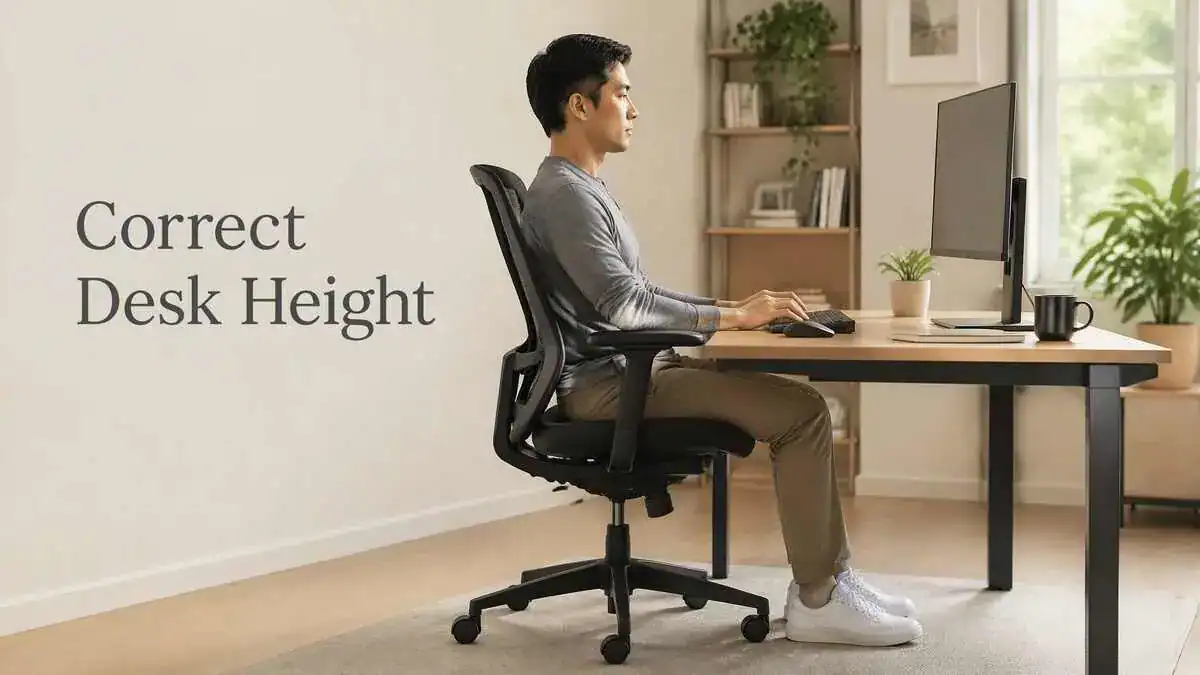
- A better ergonomic desk height matches the work surface to the person’s seated elbow height.
- The elbows should bend at about 90–120 degrees, with the forearms roughly parallel to the floor.
- The shoulders should stay relaxed, and the wrists should remain close to a neutral, straight position.
- The feet should rest flat on the floor or have firm support from a footrest.
- If a fixed desk is too high, raising the chair may create a better elbow-to-desk position. A footrest may then be needed to keep the feet supported.
- The recommended desk height depends more on body fit than on one standard measurement. The optimal desk height can vary from person to person.
- Even a well-adjusted ergonomic workstation cannot remove the effects of prolonged sitting. Regular movement and position changes still matter.
Quick Answer
For proper ergonomics, desk height should match the person rather than one fixed measurement. Fixed desks commonly measure about 28–30 inches, while adjustable desks for seated computer work may offer a useful range of about 20–28 inches (50–72 cm).
The better personal test is seated elbow height. The work surface should allow the elbows to bend about 90–120 degrees, with the forearms roughly parallel to the floor. The shoulders should stay relaxed, the wrists should remain neutral, and the feet should stay supported.
This means there is no single answer to questions such as “how tall should a desk be?” or “how high should a desk be from the floor?” A standard measurement can be a useful starting point, but the right height depends on how the desk fits the person’s body.
If a fixed desk is too high, raising the chair may bring the elbows into a better position with the work surface. If the feet then lose contact with the floor, a footrest can keep them supported.
The table below shows the main difference between a standard desk measurement and a desk height fitted to the person.
Standard Desk Height vs Ergonomic Desk Height
| Factor | Standard Desk Height | Ergonomic Desk Height |
| What it means | Common furniture measurement | Height matched to the user |
| Typical seated range | Around 28–30 in for many fixed desks | Depends on seated elbow height |
| Main test | Measurement from the floor | Elbow, forearm, shoulder, and wrist position |
| Fits everyone? | No | More personalized |
| Adjustment need | May require chair or footrest adjustment | Set around body position |
Table of Contents
When to Worry
A desk height mismatch may contribute to mild stiffness or muscle tension, especially during long periods of sitting. However, persistent, worsening, or neurological symptoms should not be treated as ordinary desk-related discomfort.
Pain Lasts for More Than a Few Weeks
Back or neck pain that lasts for more than a few weeks despite ergonomic changes may need professional evaluation. The same applies when recurring stiffness starts to limit normal daily activity.
Pain Keeps Getting Worse With Sitting
Discomfort that consistently gets worse with sitting deserves more attention. This is especially important when changing position or adjusting the workstation does not improve the symptoms.
Pain Spreads Into the Leg
Pain that spreads or radiates into the leg is different from ordinary local muscle tension around the back, neck, or shoulders. It should not be assumed to come from desk height alone.
Numbness, Tingling, or Weakness Appears
Numbness, tingling, or weakness are not ordinary signs of an incorrectly adjusted desk. These symptoms may need prompt medical evaluation rather than continued ergonomic adjustment alone.
Pain Disrupts Sleep or Comes With Fever
Pain that disrupts sleep or back pain that occurs with a fever should not be managed only by changing the workstation. Professional medical evaluation is appropriate for these warning signs.
Bowel or Bladder Changes Occur
Bowel or bladder changes together with back symptoms need prompt medical evaluation. These changes should not be treated as ordinary ergonomic discomfort.
Symptoms and Signs
An incorrect desk height may show up through changes in posture, muscle tension, or discomfort during desk work. These signs can suggest a poor fit, but they do not prove that desk height is the only cause. Prolonged sitting and other workstation factors can cause similar problems.
Shoulders Rise While Typing
Shoulder shrugging is a common sign when the desk sits too high. The elbows may also lift as the person tries to reach the work surface or keyboard. Holding this raised position can create ongoing tension in the shoulders and upper back.
Wrists Bend to Reach the Keyboard
The wrists may bend downward or extend when the keyboard sits at an awkward height. This makes it harder to keep them in a neutral position. Forearm or wrist discomfort may also develop during typing, especially when this position continues for long periods.
The Body Leans Forward
A person may lean or reach toward the work surface when the desk does not match the working position. Hunching and a rounded upper back may become more noticeable as the body tries to compensate.
These posture changes can suggest that the work surface is not at a comfortable height.
Neck Tightness Builds During Work
Neck tightness may build as the person works in a forward-leaning position. Looking downward or craning the neck toward the screen may add to this tension.
Monitor position can also affect the neck, so neck tightness should not automatically be blamed on desk height alone.
Lower-Back Pressure Builds Through the Day
Lower-back pressure or aching may gradually develop during seated work. A mismatch between the desk and chair can encourage slouching, pelvic tilt, or other posture changes that place more pressure on the lower back.
However, lower-back discomfort does not prove that the desk is the cause. Sitting duration and other factors may also contribute.
The Person Keeps Shifting to Get Comfortable
Frequent repositioning or fidgeting can be another visible sign. The person may keep shifting because no working position feels comfortable for very long.
This pattern may suggest that the current workstation position is difficult to maintain comfortably.
Sitting Leaves the Body Stiff
Stiffness may appear after a long period of sitting. The person may also find it harder to stand fully upright immediately after leaving the desk.
Prolonged sitting can contribute to this stiffness separately from a desk-height mismatch. Stiffness alone cannot show whether the desk is too high or too low.
Some posture patterns can make a high or low work surface easier to recognize at a glance.
Signs a Desk Is Too High vs Too Low
| Desk Too High | Desk Too Low |
| Shoulders shrug | Body leans forward |
| Elbows lift | Upper back rounds |
| Wrists bend or extend | Hands reach downward |
| Shoulder or upper-back tension | Neck strain |
| Typing surface feels high | Work surface feels difficult to reach comfortably |
Causes of an Incorrect Desk Height
An incorrect desk height usually starts with a poor match between the work surface and seated elbow height. When the surface sits too high or too low, the body may change position to reach the keyboard and complete normal desk work.
The Desk Is Too High for Seated Elbow Height
When the desk sits too high, the shoulders may shrug and the elbows may lift to reach the work surface. Holding this raised position creates static muscle tension, which can contribute to neck and shoulder discomfort.
In simple terms:
Desk too high → shoulders shrug or elbows lift → static muscle tension → neck and shoulder discomfort
A high work surface can also place the keyboard above a comfortable level. The wrists may leave a neutral position, while the elbows or arms move farther away from the body.
The Desk Is Too Low
A desk that sits too low can encourage the body to bend forward to reach the work surface. This can lead to hunching, a rounded upper back, and greater strain around the neck.
The cause-and-effect pattern is:
Desk too low → forward hunching → rounded upper back → neck strain
The person may also reach downward or change the trunk position to work comfortably. These changes happen because the work surface sits below a suitable working level.
Standard Height Does Not Match the Person
A standard desk height commonly falls around 28–30 inches, but a standard measurement does not automatically provide a personalized fit. Body dimensions vary, so the same desk may work well for one person and poorly for another.
This is especially important for a short or tall person. An average or typical desk height can still sit too high or too low when it does not match the person’s seated elbow height.
The Chair and Desk Do Not Work Together
Desk height and chair height need to work together. When they do not, the person may change pelvic or trunk position to reach the work surface.
A poor desk-and-chair match may encourage pelvic tilt or slouching. This can create posture imbalance and increase pressure around the lower back.
The relationship can be summarized as:
Desk-and-chair mismatch → pelvic tilt or slouching → posture imbalance → lower-back pressure
There Is Not Enough Legroom
Correct desktop height alone does not guarantee a comfortable working position. Clutter under the desk, low clearance, or a shallow workspace can restrict the legs.
Limited space may force the legs into awkward positions even when the work surface itself sits at a suitable height. Legroom is therefore part of how well the desk fits the person.
The Typing Surface Sits at the Wrong Level
Desk height also affects where the keyboard sits in relation to the hands and forearms. If the typing surface is too high or too low, the wrists may bend into an awkward position.
Holding the wrists this way can increase forearm and wrist tension during typing. The problem comes from the height relationship between the work surface and the arms rather than from the keyboard alone.
Long Static Sitting Adds More Strain
Even a correct desk height cannot offset long periods of unbroken sitting. Static loading and reduced movement can contribute to stiffness and reduced spinal mobility over time.
Prolonged sitting and desk height are related but separate factors. Desk height affects the working position, while long static sitting can add strain even when the workstation is otherwise well set up.
What It May Indicate
Patterns linked with desk height can help show whether the work surface fits the person or whether another factor may be contributing. Shoulder position, wrist angle, sitting posture, and changes in discomfort with movement can provide useful clues, but they do not diagnose the cause of pain.
Standard Desk Height May Not Be the Right Height
A desk can fall within the standard range and still be too high or too low for the person using it. Fixed office desks commonly measure around 28–30 inches, but a standard measurement does not guarantee a good individual fit.
A better fit depends on body dimensions and how the work surface lines up with seated elbow height. A conventional standard desk height may therefore work for one person but create a poor working position for another.
Raised Shoulders May Mean the Work Surface Is Too High
Shoulders that stay raised during desk work may indicate that the work surface sits too high. The elbows may also lift because the arms have to reach upward to the working level.
The wrists may then bend or extend to compensate for the height difference. When raised shoulders, lifted elbows, and wrist changes appear together, the work surface may sit above a comfortable level for that person.
Forward Hunching May Mean the Desk Is Too Low
Forward hunching may indicate that the work surface sits too low. The person may reach downward, round the upper back, or lean the trunk forward to get closer to the desk.
This altered position can be a sign that the body is compensating for a work surface that does not line up well with the seated working position.
Wrist Strain May Point to a Height Mismatch
Wrist or forearm strain during typing may point to a mismatch between the work surface and the person’s arm position. The wrong work-surface height can force the wrists away from a comfortable, neutral angle.
When this position continues, tension may build in the wrists and forearms. This pattern can suggest a height mismatch, although wrist discomfort can have other causes.
Lower-Back Pressure May Reflect a Desk-and-Chair Mismatch
Lower-back pressure during desk work may reflect a mismatch between the desk and chair rather than the desk alone. Poor workstation fit can change pelvic position and encourage slouching or other trunk changes.
These changes can increase pressure around the lower back. However, lower-back pressure does not by itself show that a medical condition is present or that desk height is the only cause.
Discomfort That Improves With Movement May Be Ergonomic or Static-Sitting Related
Local stiffness or muscle tension that eases after standing, moving, or changing position may be related to the working posture or prolonged static sitting.
Even with a suitable work-surface height, long periods with little movement can contribute to stiffness and reduced spinal mobility. A person may notice this as stiffness when getting out of the chair or difficulty staying comfortable later in the day.
Persistent or Neurological Symptoms May Have Another Cause
Symptoms that persist despite ergonomic changes may have a cause beyond desk height or workstation fit. Ergonomic adjustments alone may not resolve symptoms related to disc, nerve, joint, or other medical problems.
Neurological symptoms such as radiating pain, numbness, tingling, or weakness should not be treated as ordinary desk-height discomfort. These patterns may need medical evaluation rather than continued ergonomic changes alone.
What to Do
The best way to adjust desk height is to start with the person’s working position rather than a standard furniture measurement. The work surface should fit the body well enough to keep the shoulders relaxed, the elbows comfortable, and the wrists close to neutral.
Start With Seated Elbow Height
The person should first sit in the position normally used for desk work. The shoulders should stay relaxed, and the elbows should remain close to the body.
Next, the elbow level should be compared with the work surface. A proper desk height depends more on this body-to-desk relationship than on the height of the furniture alone.
Check the Elbow and Forearm Angle
The elbows should bend at about 90–120 degrees, while the forearms stay roughly parallel to the floor. The work surface should not force the shoulders to lift just to reach the keyboard.
These simple checks help show whether the desk is close to a comfortable working height.
Quick Desk-Height Check
A quick check can help show whether the work surface and seated position are working well together:
- Shoulders relaxed
- Elbows close to the body
- Elbows bent roughly 90–120°
- Forearms roughly parallel to the floor
- Wrists neutral
- Feet supported
- Adequate legroom
Check the Wrists While Typing
The wrists should stay as straight and neutral as possible during normal typing. They should not need to bend downward or extend sharply because of the work-surface height.
The wrist position should be checked while the person is actually using the keyboard, not only while sitting still. A proper keyboard position can help keep the wrists and forearms comfortable once the desk height is set.
Adjust a Fixed Desk Through the Chair
If a fixed desktop cannot move, chair height can be adjusted enough to bring the elbows into a better relationship with the work surface. The goal is to improve the desk-to-elbow fit rather than match a standard chair measurement.
If raising the chair leaves the feet hanging or poorly supported, extra foot support may be needed.
Use a Footrest When Needed
A footrest can keep the feet supported after the chair has been raised to match a higher desk. The feet should remain flat on the floor or rest firmly on the footrest.
This prevents a desk-height adjustment from creating a new lower-body problem. The footrest supports the sitting position; it does not replace proper chair fit.
Consider a Keyboard Tray for a Desk That Cannot Be Lowered
A keyboard tray can be useful when a fixed desk keeps the typing surface too high. It can lower the keyboard without requiring the whole desk to be replaced.
This may be especially useful when the desktop itself cannot move low enough to create a comfortable typing height.
Clear Enough Space Under the Desk
Enough space under the desk is also important. Clutter, low clearance, or other obstacles can restrict the legs even when the desktop sits at the correct desk height.
About 20–28 inches of under-desk height can provide a practical clearance range. The space should allow the legs to remain comfortable rather than forcing them into a restricted position.
Recheck the Setup During Normal Work
A desk-height adjustment should still work during normal typing and computer use. The person should notice whether the shoulders start to rise, the wrists bend, the body leans forward, or frequent shifting returns.
If those patterns appear, the setup may need fine-tuning. One measurement should not be treated as universally correct because body size, seated elbow height, and workstation fit can differ from person to person.
The best adjustment depends on which part of the setup is creating the height mismatch.
Desk Height Adjustment Options
| Problem | Practical Option | Important Check |
| Desk too high and fixed | Raise chair | Keep feet supported |
| Feet lose floor contact | Add footrest | Stable full-foot support |
| Keyboard surface too high | Add keyboard tray | Neutral wrist and forearm position |
| Desk height is adjustable | Adjust work surface | Match seated elbow height |
| Shared desk | Use height adjustment | Recheck for each user |
Ergonomic & Support Options
The right desk height becomes easier to maintain when the surrounding workstation can adjust with the person. The desk, chair, foot support, keyboard surface, monitor, and movement habits all affect how comfortable the working position feels.
Adjustable Desks Make Height Matching Easier
An adjustable desk makes it easier to match the work surface to different body sizes. A height-adjustable desk can move instead of forcing the person to adapt to one fixed furniture height.
This can be especially useful in shared workstations where more than one person uses the same desk. Each person may need a different setting because body dimensions and seated elbow height vary.
Chair Height Can Compensate for a Fixed Desk
Chair height and desk height need to work together. If a fixed desk sits too high, raising the chair may bring the elbows into a better relationship with the work surface.
The chair should only be adjusted enough to improve this relationship. The rest of the chair setup still needs to support a comfortable seated position.
A Footrest Can Restore Foot Support
When the chair must be raised to match a higher desk, the feet may no longer rest comfortably on the floor. A footrest can restore stable foot support. The feet should remain flat on the floor or supported by the footrest rather than hanging unsupported.
A Keyboard Tray Can Lower the Typing Surface
A keyboard tray can help when a fixed-height desk keeps the typing surface too high. It provides a lower surface for typing without requiring the desk itself to be replaced.
This can be a practical option when the desktop cannot move low enough for a comfortable arm and wrist position.
Monitor Height Still Needs Separate Adjustment
Correct desk height does not automatically place the monitor at the right viewing height. The top of the monitor should generally sit at or slightly below eye level.
Desk height and monitor height affect the same workstation, but they are different adjustments. A good desk position should not force the person to look too far down or crane the neck toward the screen.
Lumbar Support Helps the Back, Not Desk Height
Lumbar support may help maintain the spine’s natural curve while sitting. However, it cannot correct a work surface that sits too high or too low.
It works as one part of the seated workstation rather than as a substitute for proper desk fit.
Movement Still Matters With a Good Desk Setup
Even a well-adjusted desk does not remove the effects of prolonged static sitting. Movement breaks about every 30 minutes can help break up long periods of sitting.
Changing position and moving regularly may help reduce stiffness, muscle tension, and the effects of staying still for too long.
Very Tall and Short Users May Need More Adjustment
Standard desk-height charts may not fit very tall or very short users well. Individual seated elbow height is usually more useful than relying only on a person’s standing height or a general height-based table.
For example, someone who is 5’3″, 5’4″, or 5’7″ should not rely on height alone to choose a desk setting. The same applies to a 6-foot or 6’2″ person. Body proportions differ, so the work surface should still fit the person’s seated elbow height.
Laptop and Multi-Screen Setups Need Separate Component Adjustment
An ergonomic laptop setup may involve several adjustable parts. A laptop stand, external keyboard, or monitor arm can change how the screen and typing surface relate to desk height.
These parts should work together rather than forcing one component to compensate for another.
FAQ
What Is the Standard Desk Height?
The standard desk height for many fixed office desks is around 28–30 inches from the floor. However, a standard height is not automatically the ideal height for every person. Body size and seated elbow height still determine whether the desk fits the person comfortably.
How Tall Should a Desk Be?
A desk should be tall enough to match the person’s seated elbow height. The work surface should allow relaxed shoulders, comfortable elbows, and forearms that stay roughly parallel to the floor. There is no single desk height that fits every person because body dimensions vary.
Is a 30-Inch Desk Too High?
A 30-inch desk may be suitable for some people but too high for others. The shoulders should stay relaxed, with the elbows comfortable, forearms roughly parallel to the floor, and wrists neutral. If the shoulders or elbows must rise to reach the work surface, the desk may be too high for that person.
How Can Someone Tell if a Desk Is Too High?
A desk may be too high if the shoulders lift, the elbows rise, or the wrists bend while typing. The person may also notice shoulder, forearm, wrist, or typing discomfort. These signs suggest that the work surface may sit too high relative to the person’s seated position.
How Can Someone Tell if a Desk Is Too Low?
A desk may be too low if the person leans forward, hunches, or reaches downward toward the work surface. This position can round the upper back and contribute to neck or upper-back strain.
How High Should a Desk Be for a Short Person?
For a short person, desk height should match seated elbow height rather than standing height alone. If a fixed desk is too high, the chair may need to be raised, with a footrest added if the feet no longer rest comfortably on the floor.
How High Should a Desk Be for a Tall Person?
For a tall person, the right desk height should match the person’s seated elbow height and allow a comfortable elbow-to-work-surface relationship.
The desk should also provide enough clearance underneath so the legs are not cramped or forced into an awkward position.
Should the Chair Be Raised if the Desk Is Too High?
Sometimes. If a fixed desk cannot be lowered, raising the chair may bring the elbows into a better position with the work surface. If the feet no longer rest comfortably on the floor, a footrest may be needed.
How High Should a Desk Be From the Floor?
Many fixed desks are around 28–30 inches from the floor. However, this conventional range should be treated as a starting point rather than a universal correct height.
The better height depends on how the work surface fits the person’s seated position.
Can a Keyboard Tray Fix a Desk That Is Too High?
A keyboard tray may help when a fixed desk places the typing surface too high. It can lower the keyboard without requiring the entire desktop to be lowered or replaced.
This can help create a more comfortable typing height when the desk itself cannot be adjusted.
Sources & References
- Computer Workstations eTool — OSHA
- Office Ergonomics: Your How-To Guide — Mayo Clinic
- Selecting Office Furniture — PennEHRS, University of Pennsylvania
- General Problems and Recommendations — Cornell University Ergonomics Web
- Evaluating Your Computer Workstation — Oregon OSHA
- Standards for Computer Workstations — Duke University
Soft CTA
Getting the desk height right is one part of creating a comfortable workstation. These related guides can help with the next parts of the setup.
- Complete Ergonomic Desk Setup — See the complete ergonomic desk setup guide to bring the desk, chair, monitor, keyboard, and other parts of the workstation together.
- Desk Chair Height and Positioning — If chair height needs to change to match a fixed desk, the desk chair height and positioning guide explains how to set up the chair properly.
- Proper Keyboard Position — After adjusting the desk and chair, the proper keyboard position guide explains how to position the keyboard for a comfortable typing setup.
Update Note
Last Reviewed / Updated
Last updated: September 8, 2026
This guide is reviewed when meaningful desk-height guidance or ergonomic recommendations change. Measurements and source guidance are rechecked during relevant updates to keep the information accurate and useful.
9 thoughts on “Desk Height: How High Should a Desk Be for Proper Ergonomics?”
Comments are closed.