
TL;DR
Key Takeaways
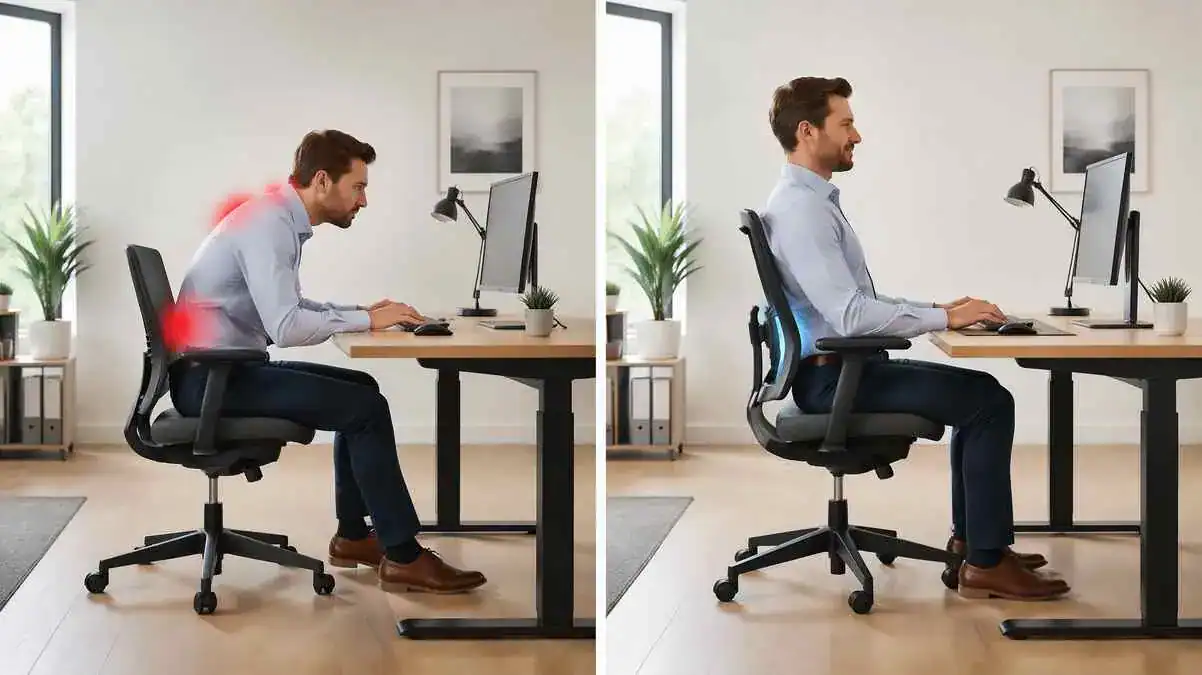
The best sitting position for back pain keeps the spine in a neutral position while allowing the body to stay relaxed and supported. The goal is not to sit perfectly all day. Instead, it is to maintain comfortable alignment and move regularly.
- Keep a neutral spine and maintain the natural curve of the lower back.
- Keep both feet flat on the floor or on a footrest if the floor feels too far away.
- Keep the knees and hips at about 90 to 100 degrees for a comfortable sitting posture.
- Use gentle lumbar support to support the lower back without pushing the body forward.
- Adjust chair height so the thighs stay supported and the shoulders remain relaxed.
- Change position often and avoid staying in one posture for hours.
- Small improvements in posture and sitting habits may help reduce discomfort over time.
Regular movement is often more important than trying to hold one “perfect” posture. Standing up, shifting position, or taking short walking breaks may help reduce stiffness and make sitting feel more comfortable throughout the day.
Quick Answer
What Is the Best Sitting Position for Back Pain?
The best sitting position for back pain keeps the body relaxed, balanced, and well supported. The spine stays in a neutral position, the lower back maintains its natural curve, and the body feels comfortable rather than stiff.
A neutral spine means keeping the back’s natural shape instead of rounding forward or arching excessively. The lumbar spine naturally curves inward. Maintaining this natural lumbar curve may help reduce unnecessary stress on the muscles and structures that support the back.
The hips and knees should usually stay at about 90 to 100 degrees. This position allows the legs to rest comfortably and helps support proper sitting posture. Exact angles are not necessary, but the body should feel stable and relaxed.
Both feet should remain flat on the floor whenever possible. If the chair is too high, a footrest may help provide support. Feet that dangle can make it harder to maintain a comfortable sitting position.
A slight recline is also acceptable and is often preferred. Leaning back slightly instead of sitting perfectly upright all day may reduce muscle effort and improve comfort. The goal is not rigid posture. The goal is a comfortable position that supports movement and everyday sitting comfort.
The 90-90-90 Rule for Comfortable Sitting
The 90-90-90 rule is a simple guideline for comfortable sitting. It means keeping the hips, knees, and ankles at about 90 degrees while sitting.
- Hips: Keep the hips level with or slightly higher than the knees.
- Knees: Bend the knees to about 90 degrees and keep them comfortable.
- Ankles: Let the ankles rest naturally with the feet flat on the floor or supported.
This rule may help create a balanced sitting position and encourage proper alignment. It is also a useful way to check whether chair height feels appropriate.
However, the body does not need to stay at exact right angles all day. People have different body shapes, chair designs, and comfort preferences. Small adjustments and regular movement are often more important than trying to maintain perfect posture every minute.
A Quick Sitting Posture Checklist
A simple checklist may help create a more comfortable sitting posture:
If readers want a complete walkthrough of each posture step, they can also learn how to sit properly in a chair to avoid back pain.
- Sit fully back in the chair and use the backrest for support.
- Keep both feet flat on the floor or on a footrest.
- Keep the knees close to hip level.
- Relax the shoulders and avoid hunching.
- Keep the head aligned above the shoulders.
- Support the lower back and maintain its natural curve.
- Keep the monitor near eye level to avoid looking down for long periods.
- Change position regularly instead of staying still for hours.
- Stand up or walk briefly throughout the day when possible.
Small posture changes are often easier to maintain than dramatic corrections. Over time, these habits may help improve sitting comfort and make long periods of sitting feel more manageable.
Good sitting posture is only one part of the picture. Understanding why sitting causes back pain can help explain how prolonged sitting, poor posture, and reduced movement place stress on the spine.
Table of Contents
When to Worry
Mild Symptoms That Often Improve With Movement
Even with the best sitting position for back pain, some people notice temporary discomfort after sitting for a long time. This does not always mean something serious is wrong.
Common symptoms that often improve with movement include:
- Temporary lower back stiffness after sitting.
- Mild lower back soreness during desk work.
- Neck tightness after looking at a screen for long periods.
- Shoulder tension or muscle fatigue.
- Feeling stiff when standing up.
- Discomfort that gradually improves after walking or changing position.
These symptoms are often linked to prolonged sitting, muscle fatigue, or staying in one position for too long. Many people notice that the body feels stiff during the first few steps and then becomes more comfortable as movement increases.
It is important to distinguish temporary stiffness from persistent symptoms. Temporary discomfort usually improves with walking, gentle movement, or posture adjustments. Persistent symptoms tend to last longer, return frequently, or gradually become more noticeable over time.
Signs That Need Professional Medical Advice
A healthcare professional should evaluate back pain if symptoms do not improve or begin to interfere with everyday life.
Professional medical advice is recommended if:
- Pain lasts longer than 2 to 4 weeks.
- Symptoms keep returning.
- Pain affects work, sleep, or daily activities.
- Pain spreads into one or both legs.
- Numbness develops.
- Tingling appears in the legs or feet.
- Ergonomic changes and posture improvements do not help.
- Discomfort becomes more frequent or more intense.
Persistent symptoms do not always indicate a serious problem. However, an evaluation may help identify possible causes and provide guidance that fits the person’s situation.
Warning Signs That Need Urgent Medical Attention
Some symptoms should not be ignored and require urgent medical evaluation.
Seek prompt medical attention if any of the following occur:
- Severe back pain after a fall, accident, or other injury.
- Pain that rapidly worsens over a short period.
- New bladder control problems.
- New bowel control problems.
- Significant weakness in one or both legs.
- Persistent numbness that suddenly appears or worsens.
- Fever together with back pain.
- Unexplained weight loss along with ongoing back pain.
These warning signs do not automatically point to a specific condition. However, they deserve timely evaluation by a qualified healthcare professional to determine the cause and the most appropriate next steps.
Symptoms / Signs
Common Signs of Poor Sitting Posture
Poor sitting posture does not always cause immediate discomfort. In many cases, the body gives small warning signs before pain becomes more noticeable.
Common signs include:
- Slouching, where the lower back rounds instead of maintaining its natural curve.
- Rounded shoulders that drift forward while sitting.
- Forward head posture, where the head moves in front of the shoulders.
- Leaning to one side or placing more weight on one hip.
- Frequent shifting or fidgeting to find a comfortable position.
- Using the hands to support the back while sitting for long periods.
These habits often develop gradually. Many people do not notice them until sitting starts to feel uncomfortable or tiring.
Lower Back Symptoms While Sitting
Lower back discomfort can feel different from person to person. Some people notice symptoms only after long desk sessions, while others experience back discomfort while driving. For longer trips, lumbar support while driving can be adjusted as part of the car-seat setup to improve lower-back contact and support a comfortable driving position.
Common lower back symptoms while sitting include:
- A dull ache in the lower back.
- Pressure or discomfort that increases while sitting.
- Mild soreness after desk work.
- Sharp discomfort when changing position or standing up.
- Lower back pain after working at a desk for several hours.
- Pain or stiffness after long drives.
Some people notice that discomfort improves after standing or walking for a few minutes. Others may find that symptoms return when they sit again.
Neck and Shoulder Symptoms
Poor sitting posture does not affect only the lower back. The neck, shoulders, and upper back may also become uncomfortable, especially during computer work.
Common symptoms include:
- Neck pain or neck stiffness.
- Shoulder tightness.
- Upper back tension.
- Headaches that develop after long sitting periods.
A common pattern looks like this:
Forward head posture
↓
Neck strain
↓
Muscle fatigue
↓
Shoulder tension
↓
Headaches
This pattern often occurs when the head stays in front of the shoulders for long periods. Over time, the muscles of the neck and upper back work harder to support the head, which may lead to fatigue and tension.
Stiffness After Sitting for Long Periods
Many people feel stiff after sitting for too long, even when the discomfort is mild.
Common signs include:
- Hip tightness.
- Lower back stiffness.
- Difficulty twisting or bending comfortably.
- Pain or discomfort when standing up.
- Feeling stiff during the first few steps after getting up.
A typical pattern is:
Prolonged sitting
↓
Muscles stiffen
↓
Standing becomes uncomfortable
↓
Walking improves symptoms
This temporary stiffness often improves with movement. However, symptoms that continue to worsen or do not improve deserve more attention.
Signs That Sitting Position May Need Adjustment
Sometimes the body signals that a sitting position is not working well.
Common clues include:
- The back hurts after desk work.
- Frequent fidgeting or shifting in the chair.
- Leaning forward without realizing it.
- Avoiding long sitting sessions because they feel uncomfortable.
- Using pillows, rolled towels, or cushions behind the lower back for extra support.
- Feeling more comfortable while standing or walking than while sitting.
These signs do not always mean there is a serious problem. However, they may suggest that posture habits, sitting behavior, or the sitting position itself needs closer attention.
Causes of Best Sitting Position for Back Pain
Slouching and Loss of the Natural Lumbar Curve
Slouching is one common reason people search for the best sitting position for back pain. When the body slouches, the lower back rounds and the natural lumbar curve becomes flatter.
This change can increase pressure on the lower back and make the muscles work harder to support the body.
Slouching
↓
Lumbar curve lost
↓
Disc pressure increases
↓
Muscle tension
↓
Back discomfort
This is why a neutral spine matters. It helps the lower back maintain its natural curve instead of collapsing forward.
Understanding how poor posture can result in back pain makes it easier to see why maintaining a neutral spine is important. Learn how changes in spinal alignment increase stress on the muscles, joints, ligaments, and spinal discs over time.
Forward Head Posture and Rounded Shoulders
Forward head posture often develops when a person looks down at a laptop or uses a monitor positioned too low. The head moves forward, and the shoulders round toward the screen.
This position can strain the neck and upper back. Over time, the muscles may feel tired, tight, or sore.
Rounded shoulders can also make proper posture harder to maintain. The body may lean forward more, which can add stress to the back during long desk sessions.
Sitting Too Long Without Movement
Even proper sitting posture can become uncomfortable when the body stays still for too long. Long sitting periods create a static posture, where the same muscles and joints remain in one position.
This may lead to reduced circulation, muscle stiffness, joint stiffness, and fatigue.
Movement is often more important than trying to sit perfectly all day. Small position changes, standing breaks, and short walks may help the body feel less stiff and more comfortable.
If discomfort mainly develops after long periods of sitting, learn more about back pain from sitting too long, including common symptoms, warning signs, and practical relief tips.
Leaning to One Side While Sitting
Leaning to one side can place more pressure on one hip and one side of the spine. This may create uneven spinal loading. For some people, this uneven pressure may also contribute to hip pain when sitting, especially when the same position is held for a long time.
Over time, this pattern may contribute to pelvic imbalance or one-sided discomfort. It may also become a habit, especially during desk work, phone use, or relaxed sitting.
A balanced sitting position helps the body distribute weight more evenly. It does not need to be rigid, but it should not repeatedly pull the body toward one side.
When discomfort is centered at the base of the spine, changes in seated pressure and pelvic position may also contribute to tailbone pain when sitting.
Poor Chair Support and Incorrect Chair Height
A chair can make sitting more difficult when it does not support the body properly. Common problems include a seat that is too high, a seat that is too deep, no lumbar support, dangling feet, or a very soft cushion.
When the feet do not reach the floor, the body may slide forward or slouch. When the lower back lacks support, the lumbar curve may flatten.
Poor chair support
↓
Slouching
↓
Poor posture
↓
Back discomfort
Correct chair height helps the feet rest flat and keeps the hips and knees in a more comfortable position.
Desk and Monitor Position Problems
A poor desk setup can also affect sitting posture. A monitor that sits too low may cause the neck to bend forward. A monitor positioned off-center may encourage twisting.
A keyboard or mouse placed too far away can make a person reach forward. This often pulls the shoulders and upper body away from the chair.
Poor setup
↓
Leaning forward
↓
Neck strain
↓
Muscle fatigue
↓
Back discomfort
A better setup keeps commonly used work items close and helps the body stay more relaxed while sitting.
When these problems continue throughout the workday, they may contribute to desk job back pain, including discomfort in the lower back, neck, shoulders, and upper back.
Weak Posture Muscles and Muscle Fatigue
Posture also depends on muscle support. Weak core muscles, weak back muscles, tight hip flexors, and tight hamstrings can make sitting upright feel more difficult.
When these muscles become fatigued, the body may start to slouch, lean, or shift frequently. This does not mean a person is lazy. It often means the body needs better support, better movement habits, or both.
Reduced posture control can make long sitting sessions feel tiring. That is why sitting comfort depends on both posture and regular movement.
What It May Indicate
It May Be a Posture Habit Issue
Sometimes discomfort while sitting is less about the chair and more about everyday posture habits. Even the best sitting position for back pain can become uncomfortable if the body repeatedly falls into poor habits.
Common posture habits that may contribute to discomfort include:
- Slouching during desk work.
- Sitting in the same position for long periods.
- Reduced posture awareness throughout the day.
- Avoiding movement and staying seated for hours.
- Leaning forward without noticing.
Static sitting can be especially challenging. When the body stays in one position, muscles may become tired and stiff. Small posture adjustments and regular movement are often more helpful than trying to sit perfectly all day.
It May Be an Ergonomic Setup Problem
Sometimes the body is trying to adapt to a workspace that does not fit well.
Common ergonomic setup problems include:
- A chair that is too high or too low.
- A seat that feels too deep or does not support the lower back.
- Poor monitor height that encourages looking down.
- A desk setup that causes reaching or leaning forward.
- An unsupported lower back during long sitting sessions.
A person may have good posture habits and still feel uncomfortable if the workstation does not provide proper support. In these situations, the issue may be the environment rather than posture alone.
Temporary Stiffness vs Symptoms That Need Attention
Not all discomfort carries the same meaning. Temporary stiffness is common after long sitting periods, while persistent symptoms may require closer attention.
| Temporary Stiffness | Persistent Symptoms |
| Usually lasts minutes to a few hours | Lasts for days or weeks |
| Often mild to moderate | May become more intense over time |
| Usually improves with walking or movement | May not improve with movement |
| Often linked to prolonged sitting | May occur even without prolonged sitting |
| Typically does not affect daily activities significantly | May interfere with work, sleep, or normal activities |
| Usually occurs without numbness or tingling | May occur with numbness, tingling, or pain spreading into the legs |
Temporary stiffness is a common response to prolonged sitting. Persistent symptoms deserve more attention, especially when they continue despite posture changes and ergonomic improvements.
Chair Problems vs Posture Problems
Both poor chair design and poor posture can contribute to discomfort. However, they do not always create problems in the same way.
| Poor Chair | Poor Posture |
| Chair height is incorrect | Slouching or leaning forward |
| Lower back lacks support | Neutral spine is not maintained |
| Seat depth does not fit the body | Forward head posture develops |
| Feet do not rest comfortably on the floor | Rounded shoulders become common |
| Discomfort improves when using a better chair | Discomfort improves when posture habits change |
| Often related to equipment setup | Often related to sitting habits and body positioning |
In many cases, both factors work together. A poorly adjusted chair can encourage poor posture, while poor posture can make even a supportive chair feel uncomfortable.
What to Do
Sit With a Neutral Spine
A neutral spine is one of the foundations of the best sitting position for back pain. It allows the spine to maintain its natural curves instead of forcing the body into a rounded or overly arched position.
Try to sit in a way that keeps the lower back gently curved and supported. Avoid slouching forward or collapsing into the chair.
The shoulders should stay relaxed rather than pulled upward. Comfortable posture usually feels balanced and natural instead of rigid.
Keep Feet Flat and Knees Around 90 Degrees
Foot placement plays an important role in sitting comfort.
Try to:
- Keep both feet flat on the floor.
- Keep the hips and knees at roughly 90 to 100 degrees.
- Allow the legs to rest comfortably without excessive pressure.
- Use a footrest if the chair height prevents the feet from touching the floor.
Exact measurements are not required. The goal is to create a stable sitting position that feels comfortable and supported.
Sit Fully Back in the Chair
Many people sit near the front edge of the chair without realizing it. This habit reduces support from the backrest and often encourages slouching.
Instead, sit fully back in the chair so the backrest can support the body. This allows the lower back to receive proper support and may reduce strain during longer sitting sessions.
Using the chair’s backrest is often more comfortable than trying to hold the body upright without support.
Relax the Shoulders and Keep the Head Aligned
The head and shoulders affect posture throughout the entire spine.
Try to keep:
- The head positioned above the shoulders.
- The chin in a comfortable, neutral position.
- The shoulders relaxed rather than rounded or elevated.
Avoid jutting the chin forward toward the screen. Forward head posture can increase tension in the neck, shoulders, and upper back over time.
Change Position Regularly
Good posture is not a single position held all day. The body generally prefers movement.
Dynamic posture means allowing small adjustments throughout the day. Weight shifting, changing sitting positions, and occasional posture changes help reduce the effects of static sitting.
Avoid trying to stay perfectly still for hours. Regular movement often feels more comfortable than rigid posture.
Take Movement Breaks Every 30 to 60 Minutes
Long periods of uninterrupted sitting can increase stiffness and muscle fatigue.
Helpful movement breaks may include:
- Standing for a few minutes.
- Walking around the room or office.
- Gentle stretching.
- Small micro-movements throughout the day.
These activities may help improve circulation and reduce feelings of stiffness that often develop during prolonged sitting.
Build Better Sitting Habits Over Time
Long-term improvements usually come from small, consistent changes rather than dramatic corrections.
Helpful habits include:
- Paying attention to posture during desk work.
- Adjusting position before discomfort becomes noticeable.
- Moving regularly throughout the day.
- Using supportive sitting setups when possible.
Building posture awareness takes time. Small adjustments repeated consistently are often easier to maintain than trying to achieve perfect posture immediately.
Ergonomic & Support Options
Chair Height and Sitting Position
The best sitting position for back pain often starts with proper chair height. A chair that fits the body well makes it easier to sit comfortably and maintain good posture. For a complete step-by-step guide to adjusting seat height, chair position, and overall chair fit, see the Desk Chair Height and Positioning guide.
Try to keep both feet flat on the floor. The knees should stay around 90 to 100 degrees, with the knees level with or slightly below the hips.
A slight recline is also acceptable and is often preferred. Leaning back slightly instead of sitting perfectly upright may reduce muscle effort and help the body feel more relaxed during long sitting sessions.
How to Use Lumbar Support Correctly
Lumbar support helps maintain the natural curve of the lower back. Understanding what lumbar support is and how it works can help explain its role in supporting a more neutral seated position.
Place the support at the natural inward curve of the lower back. The guide to where lumbar support should be explains how to position and adjust it for comfortable lower-back contact. It should feel gentle and supportive rather than firm or aggressive.
Avoid placing lumbar support too high or using support that pushes the lower back forward excessively. Too much pressure may feel uncomfortable and make it harder to sit naturally. How lumbar support helps posture also depends on using it as seated support instead of expecting it to permanently correct posture.
Lumbar Roll vs Built-In Lumbar Support
Both options can support the lower back, but they work in slightly different ways.
| Lumbar Roll | Built-In Lumbar Support |
| Separate cushion or rolled support | Integrated into the chair |
| Easy to move between chairs | Always available in the chair |
| Can be adjusted to personal preference | Adjustment depends on chair design |
| Helpful for travel or dining chairs | Convenient for everyday desk work |
| May need occasional repositioning | Usually stays in place |
Neither option is automatically better. The best choice is the one that feels comfortable and supports the natural lumbar curve. Different types of lumbar support vary in design, adjustment, portability, and how they provide lower-back support.
Monitor Height and Eye-Level Position
Monitor position can affect the neck, shoulders, and upper back. The screen should sit directly in front of the body. Ideally, the top of the monitor stays at or slightly below eye level so the neck can remain relaxed.
Keep the monitor at a comfortable viewing distance. Sitting too close may encourage leaning backward, while sitting too far away may encourage leaning forward.
A comfortable viewing angle helps the head stay aligned over the shoulders instead of drifting forward.
For detailed guidance, learn how to set the correct monitor height for comfortable viewing and a well-aligned workstation.
Keyboard and Mouse Placement
The keyboard and mouse should stay close enough that the arms can relax naturally.
Try to keep:
- Elbows around 90 degrees.
- Wrists in a neutral position.
- Forearms relaxed when possible.
- Frequently used items within easy reach.
Avoid repeatedly reaching forward for the mouse or stretching toward the keyboard. Small placement adjustments may help reduce tension in the shoulders and upper back.
When a Footrest May Help
A footrest can be helpful when the feet do not touch the floor comfortably.
This often happens when:
- The chair is too high.
- The desk height cannot be adjusted.
- Lowering the chair makes desk work uncomfortable.
Supporting the feet may improve pelvic stability and help the body stay balanced while sitting. Even a small footrest can make a noticeable difference in comfort.
Best Sitting Position at a Desk
For many people, the best ergonomic sitting position for lower back pain combines good posture with a comfortable workstation setup.
A practical desk setup often includes:
- A chair that supports the lower back.
- Feet flat on the floor or on a footrest.
- Knees around 90 to 100 degrees.
- A monitor near eye level.
- A keyboard and mouse placed close to the body.
- Relaxed shoulders and a neutral spine.
The goal is not perfect posture. The goal is a setup that feels comfortable and encourages regular movement throughout the day. For a complete guide to arranging the chair, desk, monitor, keyboard, and other workstation components, see our guide to creating an ergonomic desk setup.
Even with a good sitting position, avoiding everyday sitting mistakes that cause back pain is equally important for long-term comfort.
Sitting on a Sofa, Floor, or Dining Chair
Not every sitting surface provides the same support.
Sofas are often soft and may encourage slouching. Sitting upright with the back supported and avoiding very low or sagging cushions may help improve comfort.
Dining chairs usually provide firmer support. Sitting fully back in the chair and keeping the feet flat often creates a more stable position.
Floor sitting can be comfortable for short periods, but some people find it difficult to maintain good posture. Changing positions regularly and avoiding prolonged static sitting may help.
No sitting surface is perfect for everyone. Comfort, support, and regular movement usually matter more than the type of chair alone.
FAQ
What Is the Best Sitting Position for Lower Back Pain?
The best sitting position for lower back pain keeps the spine in a neutral position with the natural lumbar curve supported. Both feet should stay flat on the floor, the knees and hips should remain around 90 to 100 degrees, and the shoulders should stay relaxed. A slight recline is often more comfortable than sitting completely upright.
How to Sit Without Back Pain?
To sit without back pain, keep the back supported, sit fully back in the chair, keep the feet flat, and avoid slouching. Regular movement is also important. Changing position and taking short breaks may help reduce stiffness and discomfort during long sitting periods.
How to Sit With Lower Back Pain?
When sitting with lower back pain, keep the lower back gently supported and avoid rounding the spine. Sit with the hips and knees comfortably aligned and keep the feet supported. Small posture adjustments and regular movement may help make sitting more comfortable.
How to Sit Properly to Avoid Back Pain?
Proper sitting posture keeps the head above the shoulders, the spine in a neutral position, and the feet flat on the floor. The chair should support the lower back, and the monitor should sit near eye level. Avoid staying in the same position for too long.
Can Bad Posture Cause Back Pain?
Yes. Bad posture may contribute to back pain by increasing stress on muscles and other supporting structures of the spine. Common examples include slouching, forward head posture, and sitting in the same position for long periods.
Does Sitting Worsen Lower Back Pain?
For some people, sitting may worsen lower back pain, especially if posture is poor or sitting lasts for a long time without movement. However, the experience varies from person to person. Changing position regularly and improving sitting habits may help reduce discomfort.
Is Sitting or Standing Better for Lower Back Pain?
Neither sitting nor standing is automatically better for everyone. Staying in one position for too long can become uncomfortable. Many people feel better when they alternate between sitting, standing, and moving throughout the day.
What Is the Healthiest Sitting Position?
The healthiest sitting position keeps the spine in a neutral posture, supports the natural lumbar curve, and allows the body to stay relaxed. Feet should remain flat on the floor, shoulders should stay relaxed, and regular movement should be part of everyday sitting habits.
How to Sit Comfortably With Lower Back Pain?
Comfort often comes from finding a balanced position rather than holding a perfect posture. Keep the shoulders relaxed, avoid leaning forward for long periods, and use a chair that supports the lower back. A slight recline and regular movement breaks may also improve comfort.
Is Sitting Cross Legged Bad for the Back?
Sitting cross legged for short periods is not necessarily harmful for everyone. However, staying in the same crossed-leg position for a long time may encourage uneven posture or place more pressure on one side of the body. Changing positions regularly is usually a better approach.
Is Sitting on the Floor Bad for the Back?
Sitting on the floor is not always bad for the back. Some people find it comfortable, while others struggle to maintain good posture. If floor sitting causes discomfort, changing positions often or using additional support may help.
Sources & References
- Cleveland Clinic – Low Back Pain Coping Tips
- Mayo Clinic Health System – Proper Posture Is Important for Good Health
- Mayo Clinic – When to See a Doctor for Back Pain
- Harvard Health Publishing – 4 Ways to Turn Good Posture into Less Back Pain
- Harvard Health Publishing – Don’t Take Back Pain Sitting Down
- UCLA Health – Ergonomic and Proper Posture for Sitting
- UCLA Ergonomics – Postural Guide
- Canadian Centre for Occupational Health and Safety (CCOHS) – Working in a Sitting Position: Good Body Position
- Canadian Centre for Occupational Health and Safety (CCOHS) – Working in a Sitting Position: Basic Requirements
- NHS – Back Pain
- Addenbrooke’s Hospital (Cambridge University Hospitals) – Seating and Ergonomics
- Alberta Health Services – Proper Sitting for a Healthy Back
- American Academy of Orthopaedic Surgeons (AAOS) – Proper Sitting Desk Ergonomics (Infographic)
- Journal of Orthopaedic & Sports Physical Therapy (JOSPT) – Sit Up Straight
- National Center for Biotechnology Information (NCBI) – Ergonomic Interventions for Work in a Sitting Position
These references include medical guidance, ergonomic recommendations, workplace health advice, and posture research used to support the educational information presented in this article.
Learn More About Sitting Comfort
Explore More Backrested Guides
Good sitting habits are only one part of long-term sitting comfort. Posture, workstation setup, movement habits, lumbar support, office chairs, and seat cushions can all influence how the body feels throughout the day.
Readers who want to improve sitting comfort further can explore additional Backrested guides covering sitting pain, ergonomics, posture, lumbar support, desk setup, office chairs, and seat cushions.
Update Note
Last Reviewed and Updated
Last Reviewed: June 25, 2026
Last Updated: June 25, 2026
This article was reviewed for accuracy, readability, and relevance based on current ergonomic principles, posture research, and trusted health resources available at the time of publication.
Backrested regularly reviews its content to keep recommendations practical, evidence-informed, and easy to understand. Updates may include new research findings, improved ergonomic guidance, or clearer explanations related to sitting posture and back comfort.
This article is intended for educational purposes only and does not replace professional medical advice, diagnosis, or treatment. Anyone experiencing persistent, worsening, or concerning symptoms should seek guidance from a qualified healthcare professional.
1 thought on “Best Sitting Position for Back Pain: Proper Posture Tips for Everyday Comfort”
Comments are closed.