
TL;DR
Key Takeaways
Learning how to sit properly in a chair to avoid back pain can help reduce unnecessary stress on the spine, muscles, and joints. Healthy sitting habits support better posture throughout the day, but they work best when combined with regular movement instead of remaining in one position for hours.
- Sit fully back in the chair so the lower back stays supported.
- Keep both feet flat on the floor or on a footrest if needed.
- Keep the knees level with or slightly below the hips.
- Relax the shoulders and keep the elbows close to the body.
- Position the monitor at eye level and at a comfortable viewing distance.
- Avoid sitting in the same position for long periods.
- Stand, stretch, or walk every 30–60 minutes to help reduce muscle stiffness.
- Seek medical evaluation if back pain is severe, lasts for several weeks, keeps returning, or occurs with numbness, weakness, or loss of bladder or bowel control.
Quick Answer
How to Sit Properly in a Chair to Avoid Back Pain
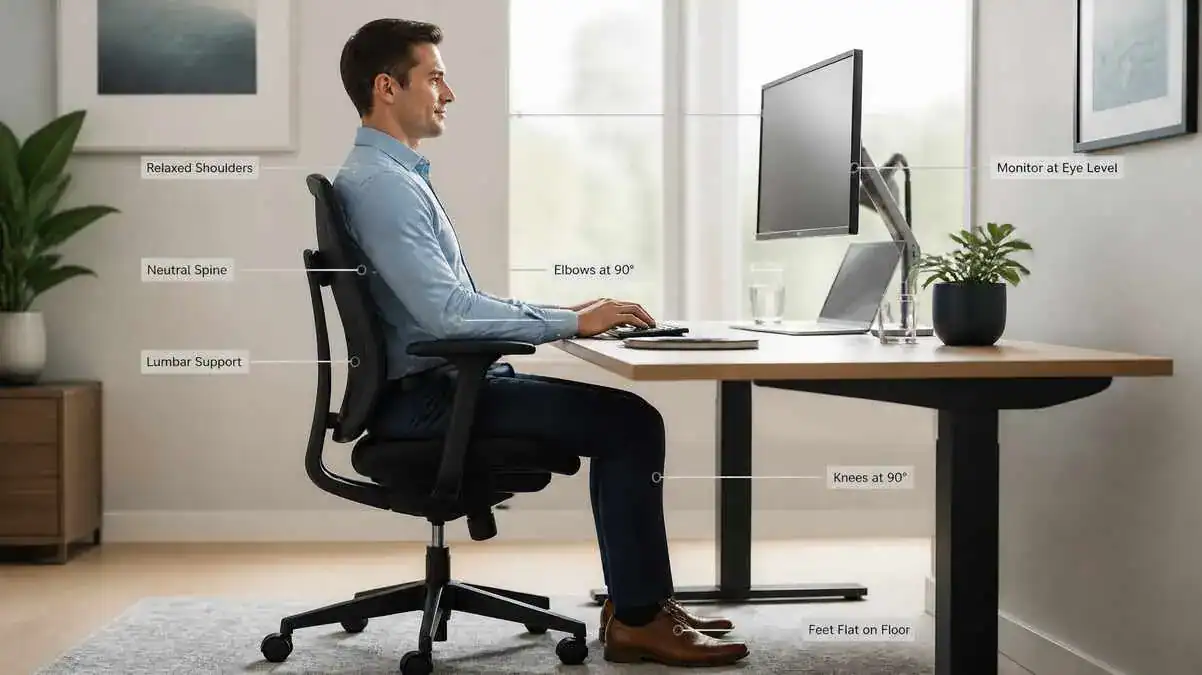
For anyone wondering how to sit properly in a chair to avoid back pain, the goal is to keep the body supported in a comfortable, natural position instead of forcing a perfectly straight posture. Good sitting posture helps reduce unnecessary stress on the spine, muscles, and joints during everyday activities.
To sit properly:
- Sit all the way back in the chair so the buttocks rest against the backrest.
- Keep the lower back supported to help maintain the spine’s natural curves.
- Place both feet flat on the floor or on a footrest if they do not comfortably reach
the floor. - Keep the knees at about a 90° angle and level with or slightly below the hips.
- Relax the shoulders and avoid slouching or leaning forward.
- Keep the elbows close to the body at about 90°, with the forearms supported when possible.
- Keep the head centered over the shoulders instead of pushing the neck forward.
- Position the monitor directly in front of the body, with the top of the screen around eye level.
For step-by-step guidance, see how to set the correct monitor height for comfortable viewing during computer work.
- Change position regularly and avoid remaining completely still for long periods. Stand, stretch, or walk briefly every 30–60 minutes to reduce muscle stiffness and encourage healthy movement.
These simple adjustments encourage proper spinal alignment and make it easier to maintain good posture throughout the day. Learn more about the best sitting position for back pain to understand how proper posture supports long-term sitting comfort.
The following sections explain each step in more detail, common sitting mistakes, and practical chair and workstation adjustments. Readers who want to optimize their entire workspace can also learn how to create an ergonomic desk setup.
Table of Contents
When to Worry
Mild Symptoms That Often Improve With Better Sitting Habits
When learning how to sit properly in a chair to avoid back pain, it is helpful to recognize which symptoms are commonly linked to sitting habits. Mild discomfort often improves after changing posture, adjusting the chair, or moving around.
Common symptoms include:
- Mild lower-back discomfort after sitting for a long time.
- Temporary stiffness when standing after being seated.
- Neck or shoulder tension during desk or computer work.
- Discomfort that eases after standing, walking, or changing position.
- Symptoms that improve after adjusting the chair or improving sitting posture.
These symptoms are often related to posture, muscle fatigue, or prolonged sitting rather than a serious medical problem. However, they should not be ignored if they become more frequent or severe.
Signs That Should Be Evaluated by a Healthcare Professional
Some symptoms need medical evaluation rather than posture changes alone. A qualified healthcare professional should assess back pain if it:
- Lasts for several weeks.
- Keeps returning even after improving sitting habits.
- Interferes with work, school, or daily activities.
- Is accompanied by leg numbness or tingling.
- Causes progressive weakness in one or both legs.
- Regularly disturbs sleep.
These symptoms may have causes other than sitting posture and deserve professional assessment.
Seek Urgent Medical Care If You Notice
Seek urgent medical care if back pain occurs with any of the following warning signs:
- Severe back pain after a fall, accident, or other injury.
- Loss of bladder or bowel control.
- Numbness around the groin or saddle area.
- Significant weakness in one or both legs.
- Fever together with back pain.
- Unexplained weight loss along with persistent back pain.
Although these warning signs are uncommon, they may indicate a serious medical condition that requires prompt evaluation.
The table below compares common posture-related discomfort that often improves with movement and warning signs that should be assessed by a healthcare professional.
Normal Sitting Discomfort vs. Warning Signs
| Usually Improves | Needs Medical Evaluation |
| Mild stiffness | Persistent pain |
| Temporary muscle tightness | Progressive weakness |
| Discomfort relieved by movement | Numbness or tingling |
| Mild neck tension | Bladder or bowel symptoms |
When warning signs are present or symptoms continue to worsen, seek prompt medical evaluation instead of relying only on posture changes.
Symptoms / Signs
Common Signs That You May Not Be Sitting Properly
Even without obvious pain, the body often shows signs that sitting habits need attention.
Recognizing these early warning signs can help people improve how to sit properly in a chair to avoid back pain before discomfort becomes more noticeable.
Common signs of poor sitting posture include:
- Slouching with a rounded back.
- Rounded shoulders instead of relaxed shoulders.
- A forward-head posture, especially while looking at a computer screen.
- Leaning to one side instead of sitting evenly.
- Sliding forward in the chair and losing back support.
- Sitting on the edge of the seat instead of using the backrest.
- Crossing the legs for long periods.
- Difficulty maintaining an upright, supported posture without feeling tired.
These posture changes often develop gradually and can become everyday habits without being noticed.
Many of these posture habits are actually sitting mistakes that cause back pain over time.
Common Symptoms Linked to Poor Sitting Technique
Poor sitting technique places extra stress on the muscles and supporting structures around the spine. As a result, discomfort usually builds slowly during long periods of sitting.
Common symptoms include:
- A dull lower-back ache.
- Tight muscles in the lower back, hips, or shoulders.
- Lower-back stiffness after sitting.
- Neck discomfort during or after desk work.
- Shoulder tension, especially after computer use.
- Buttock discomfort from prolonged sitting.
- Pain when standing after sitting for a long time.
- A feeling of being “locked” or stiff after remaining seated.
These symptoms often improve after changing position, walking, or correcting sitting posture. However, recurring symptoms should not be ignored.
Everyday Behaviors That Suggest Your Sitting Position Needs Adjustment
Sometimes daily habits reveal that the body is trying to find a more comfortable position. These behaviors often suggest that sitting posture or chair support needs attention.
Common examples include:
- Frequently changing position while sitting.
- Fidgeting to stay comfortable.
- Using the hands to help push up when standing.
- Leaning toward the computer screen instead of sitting back.
- Tucking the feet under the chair.
- Constantly shifting weight from one side to the other.
Recognizing these habits early makes it easier to improve sitting technique before they contribute to ongoing discomfort.
Causes of How to Sit Properly in a Chair to Avoid Back Pain
Sitting With a Slouched Posture
One of the most common reasons people search for how to sit properly in a chair to avoid back pain is that they spend hours sitting with a slouched posture without realizing it. Slouching usually includes rounded shoulders, a forward-head posture, and a flattened natural curve in the lower back. Over time, these changes place extra stress on the spine and surrounding muscles.
Learn more about why sitting causes back pain to better understand how sitting habits affect the spine.
As the body moves away from a neutral sitting position, the spinal discs and supporting ligaments experience greater stress. The muscles of the neck, shoulders, and back also work harder to support the upper body. During prolonged sitting, this extra effort can gradually lead to muscle fatigue and lower-back discomfort.
Cause → Effect
Slouching
↓
Loss of spinal alignment
↓
Higher stress on spinal discs and ligaments
↓
Muscle fatigue
↓
Back pain
Sitting Away From the Backrest
Sitting on the edge of the chair instead of using the backrest leaves the lower back unsupported. Many people also lean toward the desk or computer screen, making it even harder for the back muscles to maintain good posture.
Without proper lumbar support, the muscles remain active throughout the sitting session instead of sharing the workload with the chair. This often leads to faster fatigue and increasing discomfort during work or study. Different types of lumbar support provide lower-back support in different ways, depending on their design and how they work with the chair.
Cause → Effect
Unsupported sitting
↓
Poor lumbar support
↓
Posture collapse
↓
Lower-back strain
↓
Discomfort
Incorrect Chair Height and Seat Position
A chair that does not fit the body makes it harder to maintain proper sitting posture.
When the chair is too high:
- The feet do not rest flat on the floor.
- Pressure develops under the thighs.
- Sitting feels less stable and less comfortable.
When the chair is too low:
- The knees rise above the hips.
- The pelvis tilts backward.
- The body loses its natural sitting posture.
A backward pelvic position can also shift more seated pressure toward the base of the spine, which may contribute to tailbone pain when sitting.
Other adjustments also matter. A seat that is too deep can make it difficult to sit against the backrest. Armrests that are too high or too low may increase shoulder tension, while a poorly positioned backrest can reduce lower-back support. Small fitting problems like these can gradually affect posture over time.
Poor Placement of the Screen, Keyboard, and Mouse
Workstation layout also affects sitting posture. When the monitor, keyboard, or mouse is positioned poorly, the body often adapts by moving into less supportive positions.
Common examples include:
- A monitor that is too low, causing the head to tilt forward.
- A monitor that is too far away, encouraging the body to lean forward.
- A keyboard placed too far from the body, making the arms constantly reach.
- A mouse positioned too far to the side, increasing shoulder and upper-back strain.
These small adjustments may seem minor, but repeating them throughout the day can gradually affect posture.
These workstation habits are among the most common reasons people develop desk job back pain, especially during long hours of computer work.
Cause → Effect
Monitor too low
↓
Forward-head posture
↓
Neck tension
↓
Upper-back strain
↓
Poor overall sitting posture
Staying in One Position for Too Long
Even excellent sitting posture cannot completely offset the effects of remaining still for hours. The body is designed to move, and static sitting gradually places stress on muscles and joints.
As movement decreases:
- Joint motion becomes more limited.
- Muscles become stiff.
- Blood circulation slows.
- Discomfort gradually increases.
Cause → Effect
Remaining still
↓
Reduced movement
↓
Muscle stiffness
↓
Joint tightness
↓
Pain after sitting
Regular movement breaks help interrupt this cycle and support healthier sitting habits throughout the day.
Sitting Habits That Gradually Increase Back Strain
Small sitting habits may seem harmless, but repeating them every day can gradually increase stress on the spine.
Examples include:
- Crossing the legs for long periods.
- Leaning to one side.
- Twisting while sitting.
- Sitting with the feet tucked under the chair.
- Frequently reaching forward instead of bringing work closer.
These habits can create uneven loading across the back, hips, and shoulders. Over weeks or months, they may contribute to muscle fatigue and posture changes that make sitting less comfortable.
What It May Indicate
It May Indicate That Your Sitting Technique Needs Improvement
For many people, posture-related discomfort develops gradually instead of appearing suddenly. Poor sitting habits often become automatic over time, especially during long hours of desk work, studying, or computer use.
People may not notice they are slouching, leaning forward, or sitting away from the backrest until stiffness or discomfort develops later in the day. These habits can place unnecessary stress on the spine, muscles, and joints without causing immediate pain.
Improving how to sit properly in a chair to avoid back pain may help reduce this unnecessary strain before mild discomfort becomes more frequent or persistent.
It May Indicate That Your Chair or Workstation Needs Adjustment
Sometimes the body is responding to the work environment rather than sitting technique alone.
For example:
- A chair may not fit the person’s body size.
- Desk height may encourage the shoulders to lift or the arms to reach.
- A monitor that is too low or too far away may encourage leaning forward.
- Limited or poorly positioned lumbar support may make maintaining good posture more difficult.
Recognizing these environmental factors is an important first step. Small adjustments to the chair or workstation often make maintaining good posture easier and more comfortable. If the shoulders lift or the arms must reach the work surface, checking the desk height can help show whether the desk matches the seated working position.
Persistent Symptoms May Have Other Causes
Not all back pain is caused by poor sitting posture.
Existing conditions affecting the spine, muscles, joints, or nerves may also contribute to discomfort. If symptoms continue despite improving sitting habits, become more severe, or interfere with everyday activities, they should be evaluated by a qualified healthcare professional.
Recognizing the role of posture is important, but persistent or worsening pain deserves appropriate medical assessment rather than relying on posture changes alone.
What to Do
Sit Fully Back in the Chair
The first step in learning how to sit properly in a chair to avoid back pain is to use the chair as it is designed.
Follow these simple steps:
- Sit so the buttocks touch the backrest.
- Let the lower back rest comfortably against the chair.
- Avoid perching on the edge of the seat.
- Allow the chair to support the body instead of holding the upper body upright without back support.
Using the full backrest helps reduce unnecessary muscle effort and supports better spinal alignment throughout the day.
Understanding how poor posture can result in back pain makes it easier to see why proper sitting technique matters. Poor spinal alignment can gradually increase stress on the muscles, spinal discs, ligaments, and joints, leading to stiffness and posture-related discomfort over time.
Position Your Lower Body Correctly
A stable lower-body position creates a strong foundation for good sitting posture.
Aim to:
- Keep both feet flat on the floor or on a footrest.
- Keep the knees at about a 90° angle.
- Position the knees level with or slightly below the hips.
- Distribute weight evenly across both hips.
- Avoid crossing the legs for long periods.
These adjustments help improve stability and reduce unnecessary stress on the lower back and hips. If discomfort is centered around the hips, these sitting factors may also be relevant to hip pain when sitting.
Position Your Upper Body Correctly
Once the lower body is supported, the upper body can relax into a more natural position.
Focus on these habits:
- Maintain a neutral spine instead of forcing an overly straight posture.
- Keep the shoulders relaxed rather than raised.
- Keep the elbows close to the body.
- Support the forearms comfortably whenever possible.
- Keep the wrists in a neutral position.
- Keep the head centered over the shoulders instead of leaning forward.
Good upper-body alignment reduces unnecessary strain on the neck, shoulders, and upper back during desk work.
The checklist below summarizes the correct position for each major part of the body and the common sitting mistakes to avoid.
Correct Sitting Position Checklist
| Body Part | Correct Position | Common Mistake |
| Head | Centered over shoulders | Forward-head posture |
| Shoulders | Relaxed | Rounded or elevated shoulders |
| Back | Supported by backrest | Slouching |
| Lumbar Area | Supported | Unsupported lower back |
| Hips | Fully back in chair | Sitting on seat edge |
| Knees | Around 90°, level with or slightly below hips | Knees too high |
| Feet | Flat on floor or footrest | Dangling feet |
| Elbows | Around 90° | Reaching forward |
This checklist can be used as a quick reminder throughout the day to help maintain a comfortable and well-supported sitting posture.
Adjust Your Sitting Position Throughout the Day
Good posture does not mean remaining perfectly still.
Small posture changes throughout the day help reduce muscle fatigue while maintaining support for the spine.
Helpful habits include:
- Making small posture adjustments regularly.
- Gently reclining from time to time.
- Avoiding long periods without movement.
- Alternating between comfortable sitting positions while keeping the back supported.
Changing position regularly helps prevent stiffness without sacrificing good posture.
Take Regular Movement Breaks
Even when sitting posture is correct, regular movement is still important. Good posture and movement work together to support the back throughout the day.
Aim to:
- Stand up every 30–60 minutes.
- Walk for 1–2 minutes.
- Perform gentle stretches during movement breaks.
- Roll the shoulders backward a few times.
- Gently move the neck through a comfortable range of motion.
- Perform light back extensions if they feel comfortable.
These brief breaks help reduce muscle stiffness, encourage healthy circulation, and give the spine a chance to move naturally before returning to a supported sitting position.
If discomfort develops after long periods of sitting, the guide on back pain from sitting too long explains why it happens, warning signs to watch for, and practical ways to find relief.
Build Better Sitting Habits Over Time
Good posture is built through consistent habits rather than trying to sit perfectly all day.
Focus on making small improvements over time:
- Choose consistency over perfection.
- Become more aware of posture throughout the workday.
- Check sitting position regularly instead of waiting for discomfort.
- Make small adjustments before stiffness or fatigue develops.
With regular practice, healthy sitting habits become more natural and easier to maintain.
The table below highlights simple daily habits that help maintain good posture and reduce stiffness during prolonged sitting.
Healthy Sitting Habits Throughout the Day
| Habit | Suggested Frequency | Purpose |
| Posture check | Every 20–30 minutes | Prevent slouching |
| Position change | Every 20–30 minutes | Reduce static loading |
| Stand and move | Every 30–60 minutes | Improve circulation |
| Gentle stretch | During movement breaks | Reduce stiffness |
Following these habits consistently is often more effective than trying to maintain one “perfect” sitting position all day.
Ergonomic & Support Options
Adjust Your Chair for Better Sitting Posture
A properly adjusted chair makes it easier to maintain good posture without placing unnecessary stress on the body. Rather than copying someone else’s setup, adjust the chair to fit individual body size and proportions.
If the chair does not feel comfortable even after following these guidelines, the Desk Chair Height and Positioning guide explains how to adjust seat height, chair position, seat depth, armrests, and overall chair fit step by step.
Use these general guidelines:
- Adjust the chair height so both feet rest flat on the floor or on a footrest.
- Keep the knees level with or slightly below the hips.
- Leave a small gap between the back of the knees and the front edge of the seat.
- Sit close enough to comfortably use the backrest.
The table below summarizes the most important chair adjustments and why they matter.
Chair Adjustment Guide
| Chair Component | Correct Adjustment | Why It Matters |
| Chair height | Feet flat on the floor | Improves stability |
| Seat depth | Small gap behind the knees | Reduces pressure behind the legs |
| Backrest | Supports the lower back | Helps maintain the spine’s natural curve |
| Armrests | Shoulders remain relaxed | Reduces neck and shoulder strain |
| Monitor | Top of screen around eye level | Helps prevent forward-head posture |
Proper chair adjustments support healthy sitting posture, but they work best when combined with regular movement and good sitting habits.
Support the Natural Curve of Your Lower Back
The lower back naturally has a gentle inward curve. Supporting this curve helps reduce unnecessary strain during prolonged sitting. The guide to what lumbar support is explains how this support works and why it matters while sitting.
If the chair includes built-in lumbar support, adjust it so it fits comfortably into the natural curve of the lower back. The guide to where lumbar support should be explains how to position and adjust it for comfortable lower-back contact. If lumbar support is not available, a lumbar roll or a small rolled towel may provide gentle support.
The support should feel comfortable rather than forceful. If it pushes the lower back too aggressively, it may create additional discomfort instead of improving posture.
Position Your Monitor, Keyboard, and Mouse Correctly
A simple workstation setup makes maintaining good posture much easier.
For the monitor:
- Place it directly in front of the body.
- Keep the top of the screen around eye level.
- Position it about an arm’s length away.
For the keyboard:
- Keep it close enough to avoid reaching forward.
- Allow the elbows to remain near a 90° angle.
For the mouse:
- Place it beside the keyboard.
- Keep it within comfortable reach.
- Avoid lifting or shrugging the shoulders while using it.
For more detailed guidance on mouse placement, wrist alignment, arm position, and comfortable mouse use, see the guide on proper mouse position.
These small adjustments help reduce unnecessary reaching and encourage a more neutral sitting posture.
Use Armrests the Right Way
Properly adjusted armrests help support the forearms without changing shoulder position.
Aim to:
- Lightly rest the forearms on the armrests.
- Keep the shoulders relaxed.
- Avoid shrugging the shoulders.
- Avoid leaning heavily on one armrest for long periods.
If the armrests prevent the chair from moving close to the desk, lowering or removing them may allow for a more comfortable working position.
When a Footrest May Help
A footrest can improve comfort when the feet do not naturally rest on the floor.
It may be useful when:
- The feet cannot comfortably reach the floor.
- The chair cannot be lowered any further.
- The user has a shorter height.
A properly positioned footrest can:
- Improve leg support.
- Reduce pressure beneath the thighs.
- Increase sitting stability.
When Your Chair May Be Contributing to Back Pain
An unsupportive or poorly adjusted chair can contribute to back discomfort, especially during long periods of sitting.
A chair that does not fit the user’s body may encourage slouching, unsupported sitting, or awkward working positions. Limited lumbar support, incorrect chair height, or poor seat depth can also make maintaining good posture more difficult.
However, even a high-quality ergonomic chair cannot replace healthy sitting habits. Learning how to sit properly in a chair to avoid back pain, changing position regularly, and taking movement breaks remain the most important ways to support long-term sitting comfort.
FAQ
How Do You Sit Properly in a Chair to Avoid Back Pain?
To sit properly, keep the back supported, place both feet flat on the floor or on a footrest, and keep the knees at about a 90° angle. Maintain a neutral spine, relax the shoulders, and keep the head centered over the shoulders. Change position regularly and stand or walk every 30–60 minutes instead of sitting continuously.
How Should You Sit in a Chair if Your Back Hurts?
When the back hurts, focus on reducing unnecessary strain rather than forcing a perfectly upright posture. Sit fully back in the chair, support the lower back, avoid slouching, and change position regularly. If the pain persists, worsens, or interferes with daily activities, seek evaluation from a qualified healthcare professional.
Can a Bad Chair Cause Back Pain?
Yes. A poorly fitting or unsupportive chair can contribute to back discomfort by encouraging slouching, unsupported sitting, and poor posture. Proper chair adjustments and lumbar support can help, but healthy sitting habits remain just as important.
Is It Better to Sit Upright or Lean Back Slightly?
A neutral sitting posture with a slight recline of about 100–110° may reduce spinal loading for many people. Avoid excessive reclining or slouching, and keep the lower back supported while sitting.
How Often Should You Get Up From Your Chair?
Try to stand up every 30–60 minutes, even if only for a minute or two. Walk briefly, stretch gently, and reset your posture before sitting again. Regular movement helps reduce muscle stiffness, supports healthy circulation, and complements good sitting posture.
Should Lumbar Support Touch Your Lower Back?
Yes. Lumbar support should gently follow the natural inward curve of the lower back. It should feel supportive, not forceful. Correct positioning is more important than firmness, as support that pushes too aggressively may become uncomfortable and encourage poor posture.
Is Crossing Your Legs Bad for Your Posture?
Crossing the legs occasionally is generally not a concern. However, sitting cross-legged for long periods may contribute to uneven loading through the pelvis and lower back. Changing positions regularly helps reduce prolonged stress on the same muscles and joints.
What Is the Correct Sitting Position for Office Work?
For office work, sit fully back in the chair with the lower back supported. Keep the feet flat on the floor or on a footrest, maintain a neutral spine, and position the monitor around eye level. Keep the keyboard and mouse within comfortable reach, and check posture regularly throughout the workday instead of waiting until discomfort develops.
Sources & References
The information in this article is based on guidance from recognized healthcare organizations, government agencies, and evidence-based ergonomics resources, including:
- American Academy of Orthopaedic Surgeons (AAOS) – Proper Sitting Desk Ergonomics (Infographic PDF)
- Cleveland Clinic – What Is Proper Posture?
- Cleveland Clinic – Low Back Pain Coping Tips
- UCLA Health – Ergonomics and Proper Posture for Prolonged Sitting
- Cambridge University Hospitals (Addenbrooke’s) – Seating and Ergonomics
- Cornell University Ergonomics Web – Ergonomics of Sitting
- Spine-health – Office Chair: How to Reduce Back Pain
- Medical News Today – Sitting Positions: Posture and Back Health
- Medical News Today – Best and Worst Sitting Positions for Lower Back Pain
- Virginia Spine Institute – Office Chairs to Help Prevent Back Pain
- University of Turku / ScienceDaily – Reducing Daily Sitting May Help Prevent Back Pain
- University Pain and Spine Center of New Jersey (UPSCNJ) – Proper Sitting and Posture: Key to Preventing and Managing Back Pain
Peer-reviewed ergonomics and musculoskeletal research relevant to sitting posture, spinal alignment, and workplace ergonomics.
Continue Building Healthier Sitting Habits
Learning how to sit properly in a chair to avoid back pain is an important first step, but long-term sitting comfort depends on understanding the bigger picture.
Continue exploring Backrested’s evidence-based guides to learn:
Best Sitting Position for Back Pain — discover how different sitting positions affect spinal alignment and everyday comfort.
Why Sitting Causes Back Pain — understand why prolonged sitting places extra stress on the back and supporting muscles.
Back Pain From Sitting Too Long — learn how extended sitting affects the body and practical ways to reduce stiffness and discomfort throughout the day.
Together, these guides can help build healthier sitting habits, improve posture awareness, and support long-term spinal comfort.
Update Note
Last Reviewed and Updated
Last reviewed and updated: June 30, 2026