
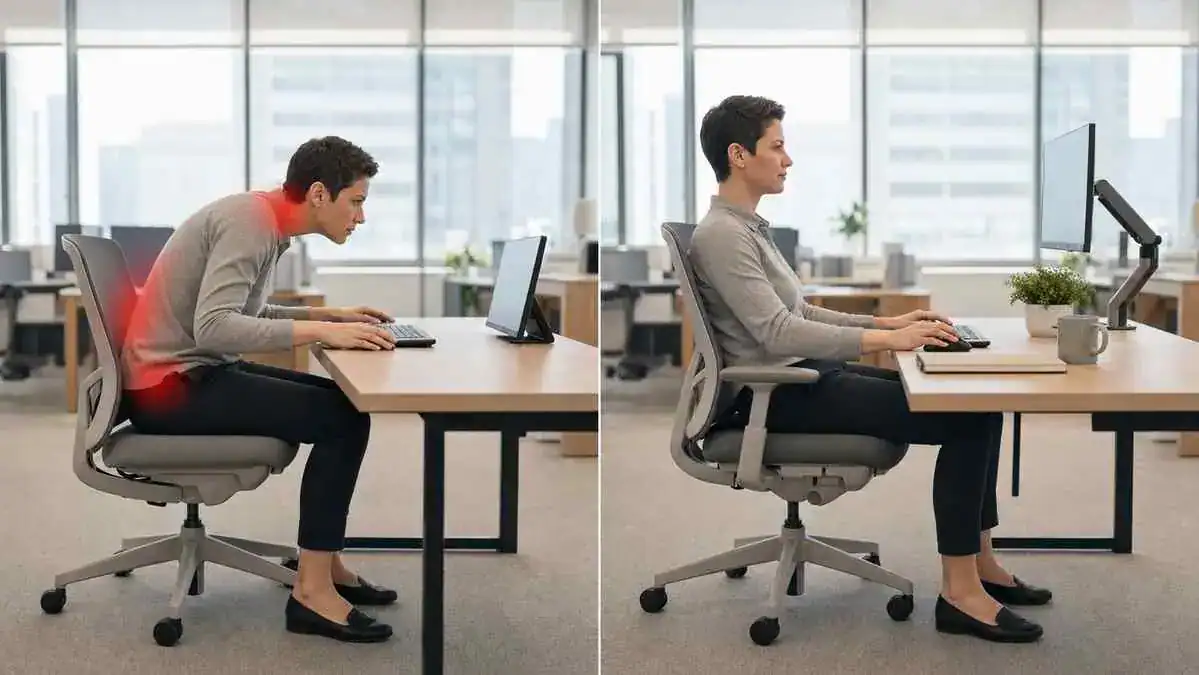
TL;DR
Key Takeaways
Desk job back pain usually develops over time rather than from one single event. Long hours of sitting, staying in the same position, poor workstation setup, and ongoing muscle tension can gradually place extra stress on the back, neck, and shoulders.
Prolonged sitting and static posture can increase muscle fatigue and reduce normal movement.
Pain often builds gradually instead of starting suddenly.
Common symptoms include:
- Dull lower-back ache
- Neck tightness
- Shoulder tension
- Upper-back fatigue
- Stiffness after standing up from a desk
Simple changes that may help include:
- Change position regularly instead of sitting still for long periods.
- Support the natural curve of the lower back.
- Raise or reposition the screen to reduce leaning.
- Keep the keyboard and mouse close to the body.
- Take short movement breaks throughout the workday.
Seek professional evaluation if pain lasts for several weeks, becomes worse, spreads into the arms or legs, or is accompanied by numbness, tingling, or weakness.
Quick Answer
Desk job back pain usually develops because the body stays in the same position for too long. Prolonged desk work reduces movement, increases static posture, and makes the muscles that support the spine work continuously. Over time, this can lead to muscle fatigue, spinal strain, stiffness, and pain.
Main cause chain:
Prolonged desk work → Reduced movement and static posture → Muscle fatigue and spinal strain → Stiffness and pain
For most desk workers, back and neck pain does not come from a single cause. Instead, it usually develops from several everyday habits working together. Prolonged sitting, slouching, forward head posture, poor lumbar support, a low monitor position, reaching for the keyboard or mouse, and a lack of movement can gradually increase stress on the back, neck, shoulders, and supporting muscles.
These habits often build up slowly throughout the workday. A worker may notice a sore lower back after sitting, a stiff neck after computer work, or shoulders that feel tight by the end of the day.
Because the discomfort develops gradually, it is easy to overlook the small habits contributing to it.
The following sections explain the common warning signs, everyday causes, and practical ergonomic changes that may help reduce desk-related back and neck discomfort.
For a step-by-step guide to arranging the entire workstation, see this guide to creating an ergonomic desk setup.
Table of Contents
When to Worry
Signs That Can Be Monitored
Not every case of desk job back pain is a sign of a serious problem. Mild discomfort often develops after long hours of sitting and may improve once the body starts moving again.
The following signs can often be monitored while paying attention to posture and work habits:
- Mild soreness after a long workday
- Stiffness that improves after walking or moving around
- Occasional posture-related headaches
- Discomfort that settles after movement or time away from the desk
These patterns are commonly linked to prolonged sitting, muscle fatigue, or temporary stiffness rather than an emergency. Even so, symptoms should be monitored to make sure they do not become more frequent or severe.
When Professional Evaluation May Be Needed
Some symptoms deserve professional evaluation, especially when they continue despite basic ergonomic improvements or healthier sitting habits. Persistent pain should not simply be ignored.
Consider seeking medical evaluation if any of the following occur:
- Pain lasts for several weeks.
- Symptoms become more frequent or gradually worsen.
- Pain limits work, driving, exercise, or everyday activities.
- Recurrent headaches develop during or after desk work.
- Ongoing shoulder or upper-back pain does not improve.
Symptoms continue despite basic ergonomic changes, regular movement, or improved workstation habits.
A healthcare professional can help determine whether the symptoms are mainly related to posture, an ergonomic issue, or another condition that needs further assessment.
The comparison below can help distinguish common posture-related soreness from symptoms that deserve professional evaluation.
Normal Desk Soreness vs Warning Signs
| Pattern | More Consistent With Temporary Soreness | Needs Professional Evaluation |
| Timing | After long work sessions | Persistent or worsening |
| Response to movement | Improves with walking | Does not settle |
| Sensation | Dull ache or stiffness | Radiating pain, numbness, or weakness |
| Daily effect | Mild and temporary | Limits work or normal activity |
Warning Signs That Need Prompt Attention
Although most desk-related discomfort develops gradually, some symptoms should not be ignored because they may indicate a more serious problem.
Seek prompt medical attention if any of the following occur:
- Radiating pain into an arm or leg
- Numbness or tingling
- Weakness in an arm or leg
- Dropping objects because of reduced hand strength
- Difficulty lifting a foot or an arm
- Sudden severe back or neck pain
- Fever with back or neck pain
- Unexplained weight loss
- Loss of bladder or bowel control
These warning signs are not typical features of everyday posture-related discomfort and should be assessed promptly by a healthcare professional.
Symptoms / Signs
Common Signs of Desk Job Back Pain
Desk job back pain often develops gradually. Many people notice discomfort only after spending several hours at a desk rather than during the first part of the workday.
Common signs include:
- A dull ache in the lower back
- A feeling of pressure or heaviness in the lumbar area
- Pain when standing after prolonged sitting
- First-step stiffness after getting out of a chair
- Difficulty bending or moving comfortably after desk work
These symptoms often become more noticeable after long periods of continuous sitting and may ease once the body starts moving again.
Neck and Upper-Back Symptoms
Desk work can affect more than the lower back. Desk job neck pain often develops alongside discomfort in the shoulders and upper back because these areas work together to support the head and upper body during computer work.
Common symptoms include:
- Neck pain from sitting at a desk
- Burning between the shoulder blades
- Upper-back pain at work
- Shoulder tension
- Reduced neck rotation when turning the head
- Occasional tension headaches
These symptoms often become more noticeable toward the end of the workday or after long periods of computer use.
Posture Changes That Often Appear
Some posture changes develop gradually during a long work session. They may happen without the worker realizing it until discomfort begins.
Common posture changes include:
- Forward head posture
- Rounded shoulders
- Slouching
- Leaning to one side
- Sitting on the edge of the chair
- Resting the chin in one hand
- Reaching toward the screen
These changes often appear together and may increase strain on the muscles that support the back, neck, and shoulders.
Symptoms Linked to Looking Down
Looking downward for long periods can place extra demand on the neck muscles. This commonly happens when using a laptop with a low screen or frequently checking a phone.
Symptoms linked to looking down include:
- Neck pain when looking down
- Pain in the back of the neck while looking down
- Laptop-related neck strain
- Tech neck pain
- Cell phone neck
- Neck pain from cell phone use
These symptoms often become worse during prolonged screen use and improve after changing position or looking straight ahead.
Symptoms That Change With Movement
One helpful clue is whether symptoms change after moving. Posture-related discomfort often behaves differently from pain that stays the same regardless of activity.
People commonly notice:
- Pain after 30–60 minutes of continuous sitting
- Stiffness that eases with walking
- Tight hips after standing
- Difficulty straightening the hips after sitting
- Discomfort during long meetings, flights, or car rides
When symptoms consistently improve after standing, walking, or changing position, they are often associated with prolonged sitting and reduced movement rather than a constant underlying problem.
Similar factors may contribute to back pain during long drives, where the body also remains seated with limited opportunities to change position. Persistent or worsening symptoms should be professionally evaluated.
When discomfort is centered around the hips, a related pattern may appear as hip pain when sitting or when first standing after a long desk session.
Causes of Desk Job Back Pain and Neck Pain
Desk job back pain rarely has a single cause. In most cases, it develops from several work habits that gradually increase stress on the spine, muscles, and joints. To better understand why sitting causes back pain, learn how prolonged sitting places stress on the spine, muscles, joints, and supporting tissues over time.The longer these habits continue without enough movement, the more likely discomfort becomes.
Prolonged Sitting Keeps the Spine Under Load
The spine is designed to move regularly throughout the day. Sitting for long periods reduces that movement and keeps the spinal discs, joints, and supporting muscles under continuous load.
If prolonged sitting is a regular part of the workday, learning more about back pain from sitting too long, can help explain why stiffness and discomfort often develop after extended periods of sitting.
As sitting continues, blood flow to spinal tissues decreases, joints move less, and pressure on the spinal discs increases—especially when sitting with a rounded back. This often happens during work hours, meetings, commuting, and even after work while relaxing at home.
Cause chain:
Prolonged sitting → Reduced movement → Muscle stiffness → Joint “rustiness” → Pain when standing
This is one reason many desk workers feel stiff or sore when they first stand after sitting for a long time.
Static Posture Tires the Muscles
The body does not have to sit in a poor position to become tired. Even a good sitting posture becomes stressful if it is held for too long.
The muscles supporting the spine gradually fatigue while holding the body upright. As they tire, posture often begins to collapse without the worker noticing.
Cause chain:
Static posture → Muscle fatigue → Reduced support → Slouching → Back and neck discomfort
Healthy sitting involves small, natural position changes throughout the day rather than trying to remain perfectly still.
Slouching Increases Back Strain
Slouching changes the way body weight is carried through the spine. The lower back rounds, the chest collapses, and the core muscles provide less support.
As a result, the spinal discs and supporting ligaments experience greater stress. Over time, this may contribute to desk-related back pain and neck pain from slouching, particularly during long computer sessions.
Although slouching is common during desk work, it is only one factor. It often combines with prolonged sitting, muscle fatigue, and poor workstation setup.
Understanding how poor posture can result in back pain can also help explain why slouching and forward head posture gradually increase stress on the spine, muscles, and supporting tissues during desk work.
Forward Head Posture Strains the Neck
Many desk workers gradually move their head closer to the screen without realizing it. Even a small forward shift increases the workload on the neck muscles.
As the head moves forward, the cervical spine experiences greater loading. The muscles across the neck, shoulders, and upper back must work continuously to support the head, leading to fatigue and tension.
Cause chain:
Low screen → Forward head posture → Neck muscle tension → Shoulder pain → Tension headaches
This is one of the most common reasons for desk job neck pain during long computer sessions.
A Low or Distant Screen Encourages Leaning
Screen position has a direct effect on sitting posture. A monitor that is too low or too far away encourages the worker to lean forward instead of sitting comfortably against the backrest.
Common workstation problems include:
- Monitor positioned too low
- Screen placed too far away
- Laptop screen below eye level
- Frequent head turning between dual monitors
- Screen glare or poor lighting that encourages leaning
Practical guidance on setting the correct monitor height and position can help reduce the need to lean forward or repeatedly strain the neck during computer work.
These habits can contribute to neck pain at a desk, computer neck strain, and upper-back fatigue over time.
Keyboard and Mouse Position Can Overload the Upper Body
The position of the keyboard and mouse influences how the shoulders, arms, and upper back work throughout the day.
When they are placed too far away, the worker often reaches forward repeatedly. This may cause the shoulders to rise, the arms to lose support, and the upper-back muscles to work harder than necessary.
Common contributing habits include:
- Reaching forward while typing
- Elevated shoulders
- Unsupported arms
- Repetitive mouse use
- Continuous typing without posture changes
Over time, these habits may contribute to neck and shoulder pain from computer work and upper-back pain from computer use.
Poor Lumbar Support Allows the Lower Back to Round
The lower back naturally has a gentle inward curve. Without adequate support, that curve often flattens during prolonged sitting.
Sitting away from the backrest or on the edge of the chair can tilt the pelvis backward and increase pressure on the lower back.
Cause chain:
Unsupported sitting → Pelvic tilt → Rounded lower back → Altered alignment → Desk-related back pain
Good lumbar support works best when combined with regular movement rather than remaining in one fixed position all day.
Chair Size and Seat Depth Change Sitting Behavior
The way a chair fits the body can affect sitting posture throughout the workday.
For example:
- A seat that is too deep may prevent full backrest support.
- A seat that is too shallow may provide less thigh support.
- Sitting on the chair edge reduces support for the lower back.
- Very soft seating may encourage slumping.
- Very hard seating may create pressure points that increase fidgeting or contribute to tailbone pain when sitting.
When a chair does not fit well, workers often adjust their posture in ways that increase strain over time.
Tight Hips and Hamstrings Affect the Lower Back
Long hours of sitting can leave the hip flexors and hamstrings feeling tight.
These muscles influence pelvic position. When they become stiff, standing upright may feel uncomfortable after sitting for a long time.
Limited hip extension and hamstring stiffness can contribute to an aching lower back when standing after prolonged desk work.
Weak or Tired Support Muscles Increase Fatigue
The muscles that support the spine work continuously during seated computer tasks.
These include the core muscles, back muscles, and upper-back stabilizers. As they become tired, maintaining an upright posture becomes more difficult.
Instead of sitting tall, the body gradually rounds forward, increasing fatigue in the back, neck, and shoulders during long work sessions.
Stress Can Increase Neck and Shoulder Tension
Physical posture is not the only factor that affects comfort at a desk. Stress can also increase muscle tension.
During busy workdays, many people unconsciously tighten the trapezius muscles across the neck and shoulders. Trigger points may develop, creating discomfort that spreads into nearby muscles.
This combination of mental stress and prolonged sitting can make neck and shoulder discomfort feel more noticeable by the end of the day.
Work-From-Home Habits Can Extend the Problem
Desk-related discomfort does not always end when the workday finishes.
Working from home may involve:
- Using a laptop on a kitchen table
- Sitting on a soft couch
- Working in bed
- Looking down at a phone after work
These habits can extend forward head posture and rounded shoulders well beyond office hours, increasing the likelihood of work-from-home back pain and neck pain.
Many everyday desk habits place repeated stress on different parts of the body. The table below summarizes common work habits, the body areas they affect, and the strain patterns they often create.
Desk-Work Habit and Likely Strain Pattern
| Desk-Work Habit | Body Area Affected | Common Result |
| Low monitor | Neck and shoulders | Forward head posture and tension |
| Sitting without lumbar support | Lower back | Rounding and pressure |
| Mouse too far away | Shoulder and upper back | Reaching and muscle fatigue |
| Static sitting | Back, hips, and neck | Stiffness and soreness |
| Low laptop use | Neck and upper back | Tech neck and rounded shoulders |
| Leaning to one side | Back and shoulders | Uneven strain |
Previous Injuries May Be Aggravated by Desk Work
People who have previously injured the back, neck, or shoulders may notice symptoms returning during prolonged desk work.
Even though desk work is generally low impact, repetitive sitting and reduced movement can aggravate older injuries or repetitive strain problems.
When symptoms repeatedly return during long periods of sitting, a healthcare professional can help determine whether changes to work habits, workstation ergonomics, or further evaluation may be appropriate.
What It May Indicate
Understanding what desk job back pain may indicate can help workers decide whether simple ergonomic changes are enough or whether professional evaluation is needed. Symptoms should always be considered alongside how they behave over time rather than based on one painful day.
Temporary Posture-Related Soreness
Many cases of desk-related discomfort are linked to posture and prolonged sitting rather than a serious underlying problem.
Temporary posture-related soreness often:
- Feels like a dull ache rather than sharp pain
- Appears after several hours of desk work
- Improves after walking or changing position
- Returns during another long period of sitting
This pattern often suggests that the muscles and joints have become stiff from staying in one position for too long.
Muscle Tension or Fatigue
Sometimes the discomfort comes mainly from tired muscles rather than deeper structures of the spine.
Common signs include:
- Tightness across the neck or shoulders
- Tender muscle knots
- Burning between the shoulder blades
- Shoulder tension that builds during the day
- Areas that feel sore when pressed
These symptoms often develop gradually as the muscles work continuously to support the head, neck, and upper body during prolonged computer work.
Joint or Spinal Irritation
Some symptoms may feel different from ordinary muscle fatigue.
Joint or spinal irritation may be more likely when discomfort:
- Feels deeper than surface muscle soreness
- Becomes noticeable during bending or twisting
- Causes sharp pain with certain movements
- Does not feel like simple muscle tightness
Although posture and prolonged sitting may contribute to these symptoms, persistent or worsening pain should be professionally evaluated.
Nerve Involvement
Symptoms affecting the nerves are different from ordinary muscle soreness and deserve careful attention.
Possible signs include:
- Numbness
- Tingling
- Weakness
- Pain that radiates into an arm or leg
- Reduced hand coordination or grip strength
These symptoms may indicate nerve involvement and should be assessed by a healthcare professional, particularly if they continue or become worse.
An Ergonomic Problem Rather Than a Medical Condition
Sometimes symptoms improve after simple changes to the workstation or sitting habits.
For example, discomfort may lessen after:
- Raising the monitor
- Adjusting the chair
- Supporting the lower back
- Taking more frequent movement breaks
If chair adjustment is part of the solution, the Desk Chair Height and Positioning guide provides step-by-step instructions for setting the correct seat height, chair position, and overall chair fit.
Improvement after ergonomic changes suggests that posture or workstation habits may be contributing to the discomfort. However, it does not confirm a specific diagnosis or rule out another underlying cause.
Checklist: Quick Desk-Pain Review
This quick checklist can help identify common habits that may be contributing to discomfort during the workday.
- Is the screen too low?
- Is the keyboard too far away?
- Are the shoulders raised?
- Is the lower back supported?
- Is the worker sitting on the chair edge?
- Has the body stayed still for more than 30–45 minutes?
- Does pain improve after walking?
- Is there numbness, tingling, or weakness?
If several of the first questions are answered “yes,” reviewing workstation setup and sitting habits may be worthwhile. If the final question is answered “yes,” professional evaluation is recommended.
A Problem That Needs Medical Evaluation
Desk-related discomfort should not be ignored if it continues despite healthier work habits and ergonomic improvements.
Professional evaluation is appropriate when:
- Symptoms persist despite workstation adjustments
- Pain gradually becomes worse
- Daily activities become limited
- Neurological symptoms such as numbness, tingling, or weakness develop
Early assessment can help identify whether the symptoms are mainly related to posture and ergonomics or whether another condition requires further investigation.
What to Do
Most cases of desk job back pain improve when workers reduce prolonged sitting, change position more often, and improve everyday workstation habits. Small adjustments made consistently are usually more effective than trying to maintain one “perfect” posture all day.
Change Position Before Pain Builds
Many people wait until discomfort becomes noticeable before moving. By that point, the muscles and joints may already be stiff.
Instead, use natural parts of the workday as reminders to change position, such as:
- Finishing an email
- Ending a phone call
- Completing a task
- Starting a new meeting
These small posture changes help reduce continuous strain without interrupting productivity.
Take Short Movement Breaks
Regular movement helps restore motion to the spine and supporting muscles after prolonged sitting.
A simple habit is to:
- Stand every 30–45 minutes
- Walk for 1–2 minutes
Gently move the:
- Spine
- Shoulders
- Hips
Even brief movement breaks can help reduce stiffness that builds during continuous desk work.
Reduce Long Blocks of Continuous Sitting
The body responds best to variety rather than remaining in one position all day.
When possible, alternate between:
- Sitting
- Standing
- Walking
Simple habits can help, including:
- Taking phone calls while standing
- Walking down the hallway between tasks
- Briefly stretching the legs after meetings
After work, avoid replacing hours of desk sitting with long periods on a soft couch, as unsupported sitting may continue the same posture patterns.
Notice Work Habits That Trigger Pain
Many desk workers repeat small habits without realizing they increase strain over time.
Many of these habits are also covered in sitting mistakes that cause back pain, including everyday positioning errors that gradually place extra stress on the spine.
Pay attention to habits such as:
Leaning toward the screen
Sitting on the chair edge
Resting the chin in one hand
Leaning on one armrest
Crossing the legs for long periods
Reaching repeatedly for the mouse
Recognizing these patterns is often the first step toward reducing unnecessary strain.
Use Gentle Movement Rather Than Staying Still
The goal is not to stretch aggressively but to encourage comfortable movement throughout the day.
Gentle movements may include:
- Shoulder rolls
- Neck side bends
- Chest-opening movements
- Seated spinal rotation
- Gentle hip and hamstring movement
These movements can help the body feel less stiff after prolonged sitting. Any movement should stay comfortable and should not increase pain.
Review Symptoms Over Time
Tracking symptoms can help identify patterns that might otherwise go unnoticed.
It may help to note:
- When pain begins during the workday
- Which tasks seem to trigger symptoms
- Whether movement improves discomfort
- Whether symptoms spread into other areas
- Whether weakness or numbness develops
Looking for patterns over several days or weeks can make it easier to decide whether workstation changes are helping or whether professional evaluation is needed.
Seek Professional Help When Needed
If symptoms continue despite healthier work habits and basic ergonomic improvements, professional guidance may be helpful.
Depending on the situation, support may come from:
- An ergonomic assessment of the workstation
- A physiotherapist
- A spine specialist
- Another qualified healthcare professional
Professional evaluation is especially important if symptoms become more severe, interfere with daily activities,or are accompanied by numbness, tingling, weakness, or radiating pain.
Ergonomic & Support Options for Desk Job Back Pain
Improving workstation ergonomics can help reduce the strain that builds during long hours of desk work. However, no chair or ergonomic accessory can completely prevent discomfort if the body remains in one position for too long. The best results usually come from combining a well-adjusted workstation with regular movement.
Set the Monitor Near Eye Level
Monitor position affects how the head, neck, and upper back align throughout the day. A screen that is too low or too far away often encourages leaning forward, increasing stress on the neck muscles.
For better posture:
- Position the top of the screen at or slightly below eye level.
- Keep the screen close enough to read without leaning forward.
- Place the main monitor directly in front of the body.
- Reduce repeated head turning when using multiple monitors.
- Improve lighting and reduce screen glare to avoid leaning toward the display.
These adjustments can help reduce unnecessary neck strain during computer work.
Keep the Keyboard and Mouse Close
The keyboard and mouse should allow the arms to stay in a relaxed position rather than reaching forward.
Aim to:
- Keep the upper arms close to the sides.
- Relax the shoulders instead of lifting them.
- Maintain elbows at about a 90-degree angle.
- Avoid reaching repeatedly for the mouse.
- Keep the wrists in a comfortable, neutral position.
Small changes to keyboard and mouse placement can reduce unnecessary strain on the neck, shoulders, and upper back.
Adjust the Chair Height
Chair height should allow the body to sit comfortably without forcing awkward positions.
For a complete step-by-step guide, see how to sit properly in a chair to avoid back pain, including chair adjustments, sitting alignment, and healthy desk habits.
A comfortable setup generally includes:
- Feet resting flat on the floor
- Hips slightly higher than the knees
- Relaxed shoulders
- Arms comfortably supported while working
If the feet cannot comfortably reach the floor after adjusting the chair, a footrest may help improve support. The desk height should also match the seated working position so the shoulders can stay relaxed and the arms can reach the work surface comfortably.
Use the Backrest
Many people gradually slide forward in the chair during the day, reducing the support the backrest is designed to provide.
Whenever possible:
- Sit fully back in the chair.
- Let the backrest support the trunk.
- Avoid sitting on the edge of the chair for long periods.
- Continue changing position regularly, even when using the backrest.
The backrest works best when it supports natural movement instead of encouraging long periods of stillness.
Support the Natural Lumbar Curve
Supporting the natural curve of the lower back can help reduce unsupported sitting.
Support may come from:
- Built-in lumbar support
- A small lumbar cushion
- A rolled towel placed behind the lower back
The goal is gentle support rather than excessive pressure. Lumbar support works best when paired with regular movement and a chair that fits the body well. If lumbar support hurts the back during desk work, support pressure or the way the chair fits the body may also need attention.
Check Seat Depth
Seat depth affects whether the worker can comfortably use the backrest.
When sitting fully back:
- Keep a small gap between the front edge of the seat and the back of the knees.
- Avoid a seat that forces the body to perch on the edge.
- Avoid a seat that encourages slumping because it is too deep.
A well-fitting seat allows better support without restricting movement.
Improve Laptop Setup
Laptops encourage looking downward because the screen and keyboard are attached.
For longer work sessions, consider using:
- A laptop stand to raise the screen
- An external keyboard
- An external mouse
These changes allow the screen to be positioned higher while keeping the hands in a more comfortable working position, reducing prolonged neck flexion. The guide to ergonomic laptop setup explains how to coordinate laptop height, screen position, an external keyboard, an external mouse, and chair adjustment for more comfortable long-term laptop work.
Understand the Limits of Ergonomic Equipment
Ergonomic equipment can reduce unnecessary strain, but it is not a complete solution.
It is important to remember that:
- A good chair cannot prevent pain if a worker stays slouched and motionless for hours.
- Lumbar support does not replace regular movement.
- Standing all day is not automatically healthier than sitting all day.
- Ergonomic tools work best when they encourage frequent position changes instead of keeping the body in one fixed posture.
The goal is not to find a perfect sitting position but to create a workstation that supports comfortable movement throughout the day.
Choosing the best sitting position for back pain can also help reduce unnecessary strain while supporting a more comfortable and balanced sitting posture.
FAQ
Why does a desk job cause back pain?
Desk job back pain usually develops because the body stays in one position for long periods. Prolonged sitting reduces movement, increases pressure on the spine, tires the supporting muscles, and encourages poor posture. Over time, these factors can lead to stiffness, muscle fatigue, and discomfort in the lower back.
Do desk jobs cause neck pain?
Yes. Desk jobs can contribute to neck pain, especially when the screen is too low, the head leans forward, or the shoulders remain tense for long periods. Static posture and prolonged computer use place extra stress on the muscles that support the neck and upper back.
Why does the back hurt after sitting at a desk all day?
Long hours of sitting reduce normal joint movement and keep the spinal muscles working continuously. This can make the lower back feel stiff, tired, or sore, particularly when standing up after sitting for several hours.
Why does the neck hurt during computer work?
Computer work often causes the head to drift forward toward the screen. Looking down at a monitor or laptop for long periods increases the workload on the neck muscles, which may lead to tightness, shoulder tension, and headaches.
Can prolonged desk work cause back and neck pain?
Yes. Prolonged desk work can contribute to both back and neck pain by combining static posture, repetitive computer use, reduced movement, and poor workstation ergonomics. Symptoms often develop gradually rather than after a single event.
Why does sitting still make desk-job pain worse?
The body is designed to move regularly. Sitting still for long periods allows muscles to fatigue, joints to stiffen, and pressure to remain on the same tissues. Frequent position changes help reduce this buildup of strain.
When should desk-related back or neck pain be checked?
Professional evaluation is appropriate if pain lasts for several weeks, becomes more severe, limits normal activities, returns frequently, or does not improve after improving workstation ergonomics and movement habits.
Can poor desk setup cause back and neck pain?
Yes. A poorly arranged workstation can encourage awkward body positions. A low monitor, unsupported lower back, incorrect chair height, or a keyboard and mouse that are too far away can all increase strain during the workday.
Why do the back and neck hurt after work?
Many people spend the entire day sitting through work, meetings, commuting, and screen time at home. The combination of prolonged sitting, limited movement, muscle fatigue, and poor workstation habits can cause discomfort that becomes more noticeable by the end of the day.
Why does standing after desk work hurt the lower back?
After sitting for a long time, the muscles and joints may become stiff because they have moved very little. Standing again can briefly increase discomfort until the body begins moving normally.
Why does looking down at a laptop hurt the neck?
Laptop screens are usually positioned well below eye level. This encourages the head to tilt forward and downward, increasing strain on the neck muscles and upper back during extended use.
Can an office chair contribute to desk-job back pain?
Yes. An office chair that does not properly support the body or does not fit the user’s size may contribute to discomfort. However, even a well-designed chair cannot prevent pain if the body remains in one position for too long.
Why do the shoulders and upper back hurt after computer work?
The shoulders and upper back often work continuously to support the arms and head during computer use. Reaching for the mouse, leaning toward the screen, or raising the shoulders can increase muscle fatigue and tension over time.
How often should a desk worker take movement breaks?
Many ergonomics experts recommend standing or moving about every 30 to 45 minutes. Even a brief one- to two-minute walk or a simple change of position can help reduce stiffness from prolonged sitting.
Can lumbar support help with desk-job back pain?
Lumbar support can help maintain the natural curve of the lower back and reduce unsupported sitting. However, it works best when combined with regular movement, good posture, and a properly adjusted workstation.
What changes may help reduce back and neck pain at a desk?
Helpful changes include:
- Raising the monitor closer to eye level
- Keeping the keyboard and mouse within easy reach
- Supporting the lower back
- Sitting fully against the backrest
- Changing position regularly
- Taking short movement breaks throughout the day
These adjustments can reduce strain but do not replace professional evaluation when symptoms persist.
What is the difference between normal desk soreness and persistent pain?
Temporary desk soreness often improves after walking, stretching gently, or taking time away from the desk. Persistent pain lasts longer, becomes more frequent, interferes with daily activities, or does not improve after basic ergonomic changes. Persistent symptoms should be assessed by a healthcare professional.
Can numbness or tingling with desk-job pain be serious?
Yes. Numbness, tingling, weakness, or pain that radiates into an arm or leg may suggest nerve involvement. These symptoms should not be ignored and should be evaluated promptly by a qualified healthcare professional.
Sources & References
- Low Back Pain and Sitting Time, Posture and Behavior in Office Workers – A Scoping Review (Journal of Back and Musculoskeletal Rehabilitation, 2025)
- Biomechanical Effects of Different Sitting Postures and Their Association With Low Back Pain (Healthcare, 2023)
- Work-related Neck Pain Among Desk Job Workers – A Cross-sectional Study
- Computer Work and Musculoskeletal Disorders of the Neck and Upper Extremity – A Systematic Review
- Workplace Factors Associated With Neck Pain Experienced by Computer Users – A Systematic Review
- Association Between Comprehensive Workstation and Neck and Upper-Limb Pain Among Office Workers
- Correlation of Prolonged Sitting Time and Sitting Posture With Low Back Pain
- CDC / NIOSH: Applied Ergonomics – Office Work and Manual Handling Guidelines
- Johns Hopkins Medicine – Addressing Neck and Back Pain When You’re Working from Home
- The Spine Foundation – Desk Jobs and Back Pain – What You Can Do Today
- Orthopedic Associates – Working a Desk Job Can Lead to Neck Pain
- UniPhysio – How Desk Job Posture Causes Neck and Shoulder Pain
Related Articles
Readers interested in preventing or better understanding desk job back pain may also find these guides helpful:
Why Sitting Causes Back Pain — Explains why prolonged sitting places stress on the spine and how daily sitting habits contribute to discomfort.
How Can Poor Posture Result in Back Pain? — Covers how slouching, forward head posture, and other posture habits affect the back over time.
How to Sit Properly in a Chair to Avoid Back Pain — A practical guide to sitting posture, chair adjustment, and healthy desk habits.
Update Note
Last Reviewed and Updated
Last reviewed and updated: July 12, 2026
It reflects current educational recommendations on workstation ergonomics, prolonged sitting, posture, and healthy movement habits.