
TL;DR
Key Takeaways
- The types of office chairs can be grouped by purpose, design, material, backrest form, and size. These labels describe different chair features, so the categories often overlap.
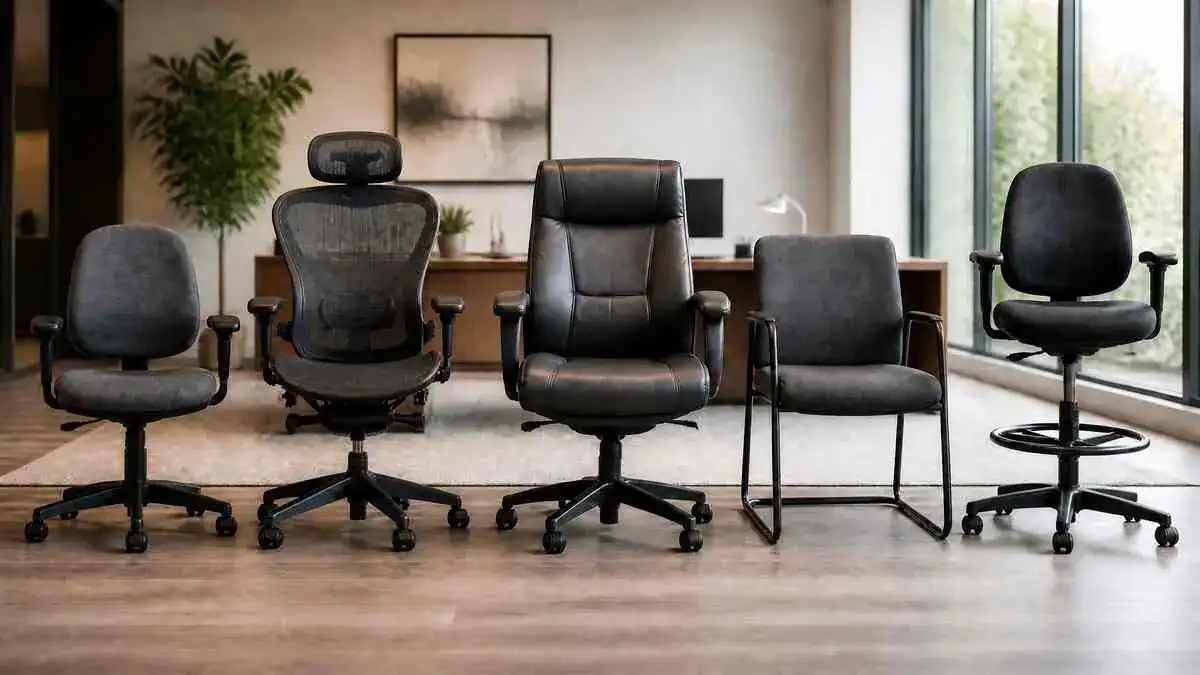
- Common office chair types include task, ergonomic, executive, conference, drafting, guest, mesh, saddle, kneeling, active, and specialty chairs.
- One chair can fit several categories at the same time. A mesh chair can also be ergonomic. An executive chair can also be high-back. An ergonomic chair can also be a task chair.
- Chair type does not automatically determine ergonomic fit. Labels such as mesh, executive, high-back, or ergonomic do not prove that a chair fits a particular person.
- A useful chair should fit the person, the work being done, the desk, and the wider workstation. No single chair type fits every body, task, or workspace.
- Material and ergonomic fit are different. Mesh describes material or construction, while ergonomic fit depends on factors such as chair dimensions, support, useful adjustments, and workstation compatibility.
- No office chair removes the need for movement. Even a comfortable sitting position can become tiring when held for too long, so regular position changes still matter.
- Persistent or worsening discomfort should not simply be blamed on chair type. Spreading pain, numbness, tingling, weakness, balance changes, or other neurological symptoms may need professional medical evaluation.
Quick Answer
The main types of office chairs are categories that describe a chair’s purpose, design, material, size, or support approach. Common examples include task chairs, ergonomic chairs, executive chairs, conference chairs, drafting chairs, guest or reception chairs, mesh chairs, saddle chairs, kneeling chairs, active or dynamic chairs, and specialty-size chairs.
These office chair types can overlap because the labels describe different things. For example, mesh describes material or construction, ergonomic describes practical fit, support, and adjustability, while task describes how a chair is used. Chair type describes the category; chair fit determines whether a particular chair works for a particular person, task, and workstation.
Table of Contents
When to Worry
Most discomfort linked with different types of office chairs may be mild and may improve after changing position or making a basic setup change. Pain or neurological symptoms that persist, spread, or get worse deserve more attention.
Discomfort That Keeps Getting Worse
Pain that keeps returning, lasts for more than a few weeks, or gets worse despite reasonable position and setup changes may need professional evaluation. The same applies when discomfort begins to interfere with work, sleep, sitting, standing, or normal daily activities.
Symptoms That Spread Beyond the Sitting Area
New or worsening pain that spreads into an arm or leg should not automatically be blamed on an office chair. Persistent numbness, tingling, or weakness also deserves professional evaluation, especially when symptoms spread or get worse.
Changes in Walking or Balance
Progressive weakness, trouble walking normally, balance problems, or other major changes in physical function need medical attention. Persistent changes in walking should not simply be managed with repeated chair adjustments.
Warning Signs That Need Urgent Attention
Prompt or emergency medical attention may be needed for new bladder or bowel problems, difficulty starting urination with back pain, numbness around the groin or saddle area, rapidly worsening leg weakness, major loss of sensation, or serious balance problems. Severe neck or back pain after significant trauma also needs urgent attention.
Other concerning patterns include severe unrelenting pain, fever or signs of systemic illness, or pain so severe that basic movement, walking, or self-care becomes very difficult. These signs should not simply be treated as a chair-fit problem.
Symptoms / Signs
Different types of office chairs can create different fit problems, but the chair label alone does not show whether a seat suits the person or task.
Observable signs such as unsupported feet, repeated sliding, poor backrest contact, raised shoulders, or frequent fidgeting can point to a mismatch worth noticing.
Some common signs that a chair may not fit well include:
- unsupported feet
- pressure behind the knees
- difficulty reaching the backrest
- raised shoulders from the armrests
- repeated sliding forward
- difficulty moving the chair close enough to the desk
- discomfort that builds during prolonged sitting
Signs the Seat May Not Fit
Feet that hang without stable support can be a sign that the seat is too high. This can increase pressure under the thighs and may lead to repeated sliding forward.
Office chair seat depth may not fit when the seat presses behind the knees or makes it hard to reach the backrest without sliding forward. A seat that is too shallow may provide too little support under the thighs, creating concentrated pressure or an unstable feeling.
Detailed desk chair height and positioning can help show how seat height, foot support, and chair position work together.
Signs the Backrest or Support May Not Fit
A backrest should provide usable support without creating a hard pressure point in the lower back. Poor lumbar contact, concentrated pressure, or repeatedly leaning away from the backrest can suggest that the support does not fit well.
Another sign is difficulty finding more than one comfortable, supported position. A backrest that makes position changes difficult may not provide enough useful support for normal movement during desk work.
Signs the Armrests May Not Fit
Armrests may not fit when they raise the shoulders, push the elbows outward, or provide little useful support. They can also cause problems when they prevent the chair from moving close enough to the desk.
When fixed armrests block desk access, the chair may stay too far back. This can lead to forward leaning and reduced backrest support.
Signs the Chair Does Not Match the Task
A chair may fit reasonably well but still be poorly suited to the work being done. For example, conference chairs usually have fewer controls and are designed more for meetings and shorter sitting periods than prolonged computer work. Guest and reception chairs are also generally not intended as primary all-day workstation chairs.
A drafting chair may become unsuitable if its higher seat leaves the feet without useful support. Alternative seats such as saddle, kneeling, or perching chairs may also become tiring during prolonged work because their support patterns differ from conventional task chairs.
A chair design that restricts needed movement or makes work equipment harder to reach can be another sign that the chair does not match the task.
Signs the Workstation May Be Part of the Problem
Not every sitting problem comes from the chair. Leaning toward the screen, reaching for the keyboard or mouse, or raising the shoulders during computer work can point to a mismatch elsewhere in the workstation.
The chair staying too far from the desk is another clue. If the person must lean forward or lose backrest contact to reach work equipment, the chair and workstation may not be working well together.
Signs the Body Needs a Position Change
Stiffness, fatigue, pressure, and frequent fidgeting can build when the body stays in one position for too long. Even a comfortable sitting position may become tiring when held for a long period.
Discomfort that builds during long sitting but eases after standing, walking, or changing position can also signal a need for more movement. Prolonged sitting with too few position changes can contribute to stiffness and reduced movement tolerance.
Causes: Why Types of Office Chairs Differ
The types of office chairs differ because manufacturers design chairs around different tasks, work settings, materials, body-size needs, support approaches, and sitting patterns. Office chair names therefore do not all describe the same characteristic. Some describe the job, while others describe the chair’s material, size, backrest, or support design.
Some Chair Names Describe the Job
Some office chair types are named mainly for their intended work setting or use. Common examples include task chairs, executive chairs, conference chairs, drafting chairs, guest or reception chairs, and 24-hour or intensive-use chairs.
A task chair is associated with desk and workstation tasks, while a conference chair is designed mainly for shared meeting spaces. Drafting chairs serve higher work surfaces, and guest or reception chairs serve visitors and shorter sitting periods. These names describe what the chair is designed to support rather than every feature it may have.
Some Names Describe Ergonomic Design
Other chair names describe how the chair approaches fit and support. Ergonomic chairs, adjustable task chairs, and active or dynamic chairs can fall into this group.
However, “ergonomic” is not simply an office chair style. Practical ergonomic value depends on whether the chair’s dimensions, support, and usable adjustments fit the person and task. The chair also needs to work with the wider workstation.
Some Names Describe the Material
Mesh chairs, fabric or upholstered chairs, and leather chairs are named partly by their materials or construction. These features can affect surface feel, cushioning, flexibility, and ventilation.
Material and ergonomic fit describe different things. Material describes construction and feel, while ergonomic fit depends on dimensions, support, useful adjustment, and the chair’s relationship with the workstation. A mesh, fabric, or leather surface alone does not make a chair ergonomic.
Some Names Describe Backrest Size
High-back, mid-back, and low-back chairs describe the amount of backrest coverage. A high-back chair provides more coverage than a lower-back design, but that does not automatically mean it provides better lower-back support.
Backrest height and lumbar support are separate features. A high backrest describes coverage, while lumbar support describes contour and contact around the lower back.
Some Names Describe Body-Size Accommodation
Big-and-tall chairs and other special-size seating describe chairs made around particular size or accommodation needs. These labels can help identify a general category, but the label itself does not prove that a chair will fit a particular person.
Actual chair dimensions, adjustment ranges, and rated capacity matter more than a broad size label. A larger chair is not automatically a better-fitting chair.
Some Chairs Use a Different Sitting Approach
Saddle chairs, kneeling chairs, perching or sit-stand stools, and active or dynamic chairs support the body differently from a conventional office chair.
For example, a saddle chair creates a higher, semi-standing seated position, while a kneeling chair transfers some support toward the knees and shins.
Perching stools provide partial support between sitting and standing. Active or dynamic chairs allow movement through features such as rocking, tilting, or a moving seat or base. These designs change the sitting approach, but they should not be treated as automatic posture fixes or back-pain treatments.
One Chair Can Belong to Several Categories
Different office chair classifications can apply to the same chair because each label may describe a different characteristic. For example:
- A chair can be mesh + task + ergonomic.
- A chair can be leather + executive + high-back.
- A chair can be big-and-tall + ergonomic + task.
- A chair can be high-back + mesh + executive.
This overlap means one office chair can fit several categories. Each label may describe a different feature of the chair.
The table below shows what some common office-chair labels mainly describe.
| Label | Mainly Describes |
| Task | Purpose |
| Conference | Purpose and setting |
| Drafting | Purpose and work-surface height |
| Mesh | Material and construction |
| Leather | Material |
| High-back | Backrest form |
| Big-and-tall | Size and accommodation |
| Ergonomic | Fit, support, and design approach |
| Kneeling | Alternative seating design |
| Saddle | Alternative seating design |
What It May Indicate
The types of office chairs describe broad categories, but those categories do not show how well a particular chair will work for a particular person. How a chair feels and performs during real work depends on its fit, support, usable features, task, and relationship with the workstation.
Chair Type and Chair Fit Are Different
Chair type describes what a chair is designed or marketed to do. Chair fit describes whether that particular chair works for the person using it.
For example, a chair may be sold as a task chair or ergonomic chair, but the label does not show whether its seat depth, height range, backrest, or armrests suit the user. Chair type describes the category; chair fit depends on the individual chair and user.
More Adjustments Do Not Always Mean Better Fit
More adjustments do not automatically make an office chair a better fit. Adjustability is useful when the available ranges suit the user and the controls are easy to reach and use.
The settings also need to support the task and work with the desk. A chair with many adjustable features can still fit poorly if the adjustment ranges are unsuitable or useful settings cannot be used during normal work.
Comfort Does Not Always Mean Ergonomic Fit
A chair can feel soft and comfortable at first without providing a good ergonomic fit during longer periods of desk work. Short-term comfort and practical fit are not the same.
For example, a comfortable chair may still have a seat that is too deep or too high. It may also make desk access difficult or provide poor support during sustained work. Real desk use can reveal fit problems that are not obvious when first sitting down.
A Specialty Chair Usually Has a Specialty Purpose
Specialty chairs make more sense when their design matches the task or work setting. A drafting chair supports work at an elevated surface, while saddle chairs often suit close-access tasks.
Perching stools can support brief changes between sitting and standing. The same principle applies to intensive-use and other specialized office chairs. A design made for a particular environment does not automatically make it suitable for every desk, task, or sitting pattern.
Discomfort Does Not Identify a Diagnosis
Chair fit can contribute to discomfort, but it is only one possible factor. Workstation mismatch and long periods of static sitting can also contribute to pressure, stiffness, or muscle fatigue.
Symptoms alone cannot prove that a chair caused an injury or identify a medical condition.
Discomfort that appears during desk work may reflect several interacting factors rather than one specific cause.
What to Do
Understanding the types of office chairs is useful, but the chair category is only one part of the picture. A practical starting point is to consider the work the chair supports, how the chair fits the user, and whether it works with the surrounding desk and equipment.
Start With the Work the Chair Needs to Support
Different work settings place different demands on a chair. Computer work, meetings, visitor seating, elevated work surfaces, close-access tasks, shared workstations, and continuous-use environments do not all require the same type of seating.
The chair type should make sense for the work being done. A chair designed for short meetings serves a different purpose from one intended for regular workstation use or an elevated work surface.
Separate the Chair Type From the Chair Fit
Two questions can help keep the distinction clear:
- What type of chair is this?
- Does this particular chair fit the user and workstation?
The first question identifies the chair category. The second considers whether its dimensions, support, and usable features work for the person, task, and workspace. A suitable chair type can still be a poor individual fit. The How to Choose an Office Chair guide explains what to check when comparing chair fit, adjustments, support, and workstation compatibility before buying.
Check the Main Contact Points
A broad fit check should consider how the body contacts and uses the chair. The feet should have stable support, while the seat should support the thighs without uncomfortable pressure.
The backrest and lower-back area should provide usable support rather than a hard pressure point. If armrests are present, they should support the arms without forcing the shoulders upward or the elbows too far outward.
Check Whether the Chair Works With the Desk
A chair also needs to work with the desk and nearby equipment. The user should be able to approach the work area, reach common input devices, use the backrest, maintain foot support, and still have room to change position.
A chair may fit the body but work poorly with the desk. For example, obstructive armrests can keep the chair too far away, leading to forward leaning and reduced backrest use.
A complete ergonomic desk setup also considers how the chair works with the desk, monitor, keyboard, mouse, and other equipment.
Change Position During Long Work Sessions
No office chair removes the need for movement. Even a well-supported position can become tiring when the body stays there for too long. Back pain from sitting too long can also involve prolonged static sitting, limited position changes, and other factors beyond the chair itself.
The relationship is simple:
long uninterrupted sitting → fewer position changes → stiffness and fatigue → discomfort.
Short movement breaks and normal changes in sitting position can reduce long periods of static loading.
Reassess Persistent Problems
If reasonable changes to the chair, sitting pattern, or workstation do not settle persistent or worsening discomfort, chair type should not automatically be treated as the cause.
Symptoms that continue, worsen, spread, or occur away from the workstation may need further evaluation rather than repeated chair changes alone.
Ergonomic & Support Options
The types of office chairs differ in purpose, construction, support, size, and the way they support sitting. Some are made for everyday desk work, while others are designed for meetings, elevated work surfaces, visitors, continuous-use settings, or specialized tasks.
This quick comparison shows how the main chair types differ in their design, common use, and main limitations.
| Chair Type | What Defines It | Common Use | Main Limitation |
| Task chair | Desk-work design | Computer and desk work | Fit depends on available adjustments |
| Ergonomic chair | Fit, support, and usable adjustment | Regular workstation use | Label alone does not prove fit |
| Executive chair | Larger, often high-back design | Executive and managerial spaces | Size and padding do not guarantee fit |
| Conference chair | Shared meeting seating | Meetings | Often less adjustable |
| Guest/reception chair | Simple visitor seating | Waiting and visitor areas | Not usually intended for all-day desk work |
| Drafting chair | Higher seat range | Elevated work surfaces | Requires useful foot support |
| Saddle chair | Saddle-shaped seat | Close-access and specialized tasks | Limited back support on many designs |
| Kneeling chair | Knee/shin-supported design | Short or specific tasks | Can load the knees and shins |
| Perching stool | Semi-standing support | Sit-stand transitions | Less full-body support |
| Active chair | Moving seat or base | Movement-oriented sitting | Not a pain treatment |
| Big-and-tall chair | Size-specific construction | Different size or capacity needs | Bigger does not automatically fit better |
| 24-hour chair | Heavy-duty shared seating | Control and dispatch environments | Durability does not guarantee individual fit |
Task Chairs
A task chair is a practical office chair designed for desk work. Task chairs commonly have a compact swivel design and a low- or mid-height backrest. Some provide only basic adjustments, while others offer a wider range of adjustable features.
Task chairs are commonly used for everyday desk work, computer work, shared desks, and smaller workspaces. However, the amount of adjustment varies greatly. Fixed seat depth, limited lumbar adjustment, or fixed armrests can make some task chairs harder to fit comfortably.
In simple terms, a task chair or task office chair is a chair designed mainly for common desk and computer work.
Ergonomic Office Chairs
Ergonomic office chairs are designed around practical fit, support, movement, and adjustment during desk work. Depending on the chair, features may include adjustable seat height, seat depth, lumbar or backrest position, recline, and adjustable armrests.
These features are most useful when their adjustment ranges suit the person and the chair works well with the desk and equipment. Having more controls does not automatically make a chair a better fit.
The guide to what makes an office chair ergonomic explains practical fit, support, and useful adjustment in more detail.
Executive Chairs
Executive chairs commonly have a taller backrest, larger dimensions, thicker padding or upholstery, and sometimes head support. Some offer many adjustments, while others place more emphasis on padding, appearance, and executive styling.
These chairs are common in managerial and executive workspaces. They may also suit people who prefer more upper-back coverage. However, a larger or deeper chair does not automatically provide a better fit.
A high backrest also does not guarantee good lumbar support. Thick or soft padding may feel comfortable, but padding alone does not make a chair ergonomic.
Conference Chairs
Conference chairs are mainly designed for shared meeting rooms. They often have fewer controls than adjustable task chairs and may have fixed arms, fixed backrests, or simpler mechanisms.
They are commonly used for meetings, visitors, and shorter sitting periods. Their limited adjustment can make them less adaptable for prolonged computer work.
Guest and Reception Chairs
Guest and reception chairs provide simple seating for waiting areas, reception spaces, visitors, and short conversations. They are often fixed-height and commonly have legs or a sled-style base.
These chairs can work well for short visits, but their fixed dimensions provide less room for individual adjustment. They are generally not designed to serve as all-day computer chairs.
Drafting Chairs
Drafting chairs have a taller seat-height range for work at elevated surfaces. They are commonly used with drafting tables, laboratory surfaces, high workbenches, and counters. A foot ring or another form of effective foot support is an important feature.
The relationship is simple:
elevated seat → feet lose floor contact → foot support becomes important.
Without stable foot support, pressure under the thighs may increase, and the body may start sliding or slumping.
Mesh Office Chairs
Mesh office chairs use mesh as part of the chair’s construction. They commonly have a flexible mesh backrest and may also have a mesh seat. Mesh can improve ventilation and may provide flexible, responsive back support. However, a mesh chair does not automatically provide good lumbar support or suitable dimensions.
Frame edges, backrest contours, seat dimensions, and available adjustments still affect how well the chair fits. Mesh describes the material or construction. Good ergonomic support still depends on how well the chair fits and supports the person using it.
Fabric, Upholstered, and Leather Chairs
Fabric, upholstered, and leather chairs differ mainly in their surface materials and construction.
Upholstery and cushioning can affect surface feel, padding, and appearance. Leather is also common on executive-style chairs.
No material automatically provides better ergonomic support. The chair’s dimensions, support, pressure distribution, and useful adjustments still matter.
High-Back, Mid-Back, and Low-Back Chairs
High-back, mid-back, and low-back chairs differ in how much backrest coverage they provide. A high-back chair covers more of the back, while mid- and low-back chairs provide less coverage.
Backrest height and lower-back support are different features. A taller backrest does not automatically provide better lumbar support. A high-back chair can still have poor contact with the lower back.
Saddle Chairs
A saddle chair has a saddle-shaped seat that creates a wider hip position and places the body higher than a conventional chair. This creates a semi-standing style of sitting.
Saddle chairs are often used in dentistry, clinical work, at counters, and during close-access tasks that involve frequent movement. Many models provide little or no back support. Some people may also notice localized pressure or fatigue during longer periods of use.
For this reason, a saddle chair that works well for a specific task may not work as well for prolonged computer work.
Kneeling Chairs
A kneeling chair usually combines a forward-sloping seat with padded supports for the knees or shins. Many models have no conventional backrest and transfer some of the body’s support toward the knees and shins.
This design may work for some people during short or specific tasks. However, it can increase pressure on the knees and shins, limit position changes, cause fatigue, and make getting into or out of the chair awkward.
Kneeling chairs do not automatically correct posture, and they are not a treatment for back pain.
Perching and Sit-Stand Stools
Perching and sit-stand stools support part of the body’s weight in a higher, semi-standing position. They provide a middle position between full sitting and standing.
They can be used for brief position changes as part of a sit-stand workstation, at counters, and in similar work areas. However, they generally provide less full-body support than a conventional task chair and may become tiring when used as the only seat for prolonged desk work.
Active and Dynamic Chairs
Active or dynamic chairs have a seat or base that can move, rock, or tilt. This movement allows small position changes while sitting.
These chairs may change the way a person moves while seated, but comfort varies from person to person. Dynamic sitting has not been established as a stand-alone treatment for low-back pain.
Big-and-Tall and Special-Size Chairs
Big-and-tall and other special-size chairs have wider, deeper, or otherwise size-specific dimensions. They may also have a higher rated weight capacity and reinforced components.
These features can help accommodate people who do not fit standard chair dimensions.
However, a larger chair does not automatically mean a better fit. A seat that is too deep can make it difficult to use the backrest. A chair that is too wide can place the armrests too far from the body. Both the chair’s dimensions and its rated capacity matter.
24-Hour and Intensive-Use Chairs
24-hour and intensive-use chairs use robust construction for workplaces where chairs may be used continuously or shared by several people. Common settings include control rooms, dispatch centers, security areas, and other continuously staffed workplaces.
These chairs may provide adjustments for different users, but durability and high load capacity do not guarantee a good individual fit. A shared chair may still feel uncomfortable when its settings do not suit the current user.
Gaming Chairs Used for Desk Work
Gaming chairs are also used as desk chairs and may include features found on other office chairs. Their appearance often includes gaming-focused styling, high backrests, padding, and other distinctive design features.
Styling or branding does not show how well a gaming chair will fit. The chair still needs suitable dimensions, useful support, workable adjustments, and a good fit with the desk and equipment. A closer gaming chair vs office chair comparison can help explain how their design, support features, and adjustments differ.
For long gaming sessions, back pain from gaming can also involve sitting duration, movement, chair fit, screen position, and control reach.
How Different Types of Office Chairs Can Overlap
The different types of office chairs can overlap because their names describe different features or uses:
- Task = everyday desk use
- Executive = style and work use
- Conference = meeting-room use
- Drafting = work at elevated surfaces
- Mesh = material or construction
- High-back = amount of backrest coverage
- Big-and-tall = size and accommodation
- Ergonomic = fit, support, and useful adjustment
- Saddle, kneeling, and perching = different ways of supporting the body while sitting
For example, one chair may be a mesh ergonomic task chair, while another may be a high-back executive chair. A single office chair can fit more than one category.
FAQ
What are some common types of office chairs?
Common types of office chairs include task chairs, ergonomic chairs, executive chairs, conference chairs, drafting chairs, guest chairs, mesh chairs, saddle chairs, kneeling chairs, active chairs, and special-size chairs.
What are the different classifications of office chairs?
Office chairs can be grouped in several ways. Task, conference, and drafting chairs describe how or where a chair is used. Mesh and leather describe material. High-back describes backrest coverage, while big-and-tall describes size and accommodation. Ergonomic describes an approach based on practical fit, support, and useful adjustment.
What are the different types of computer chairs?
Common types of computer chairs include task chairs, ergonomic office chairs, executive chairs, mesh chairs, high-back chairs, and gaming chairs used at desks. Whatever the type, the chair still needs to fit the person, computer work, desk, and other equipment.
What is a task chair?
A task chair is an office chair designed mainly for everyday desk and computer work. It commonly has a swivel base, a low- or mid-height backrest, and some level of adjustment.
What is the most common type of office chair?
Task-style chairs are widely used for everyday office and computer work, but there is no single chair type that can be called the most common in every workplace. Their practical desk-work design makes them a common form of office seating.
What type of chair is best for office work?
No single office chair type is best for every person or job. The chair type should suit the work being done, while the individual chair should fit the person, desk, and wider workstation.
What are chairs with wheels called?
Office chairs with wheels are commonly called rolling chairs or swivel chairs with casters. Casters are the small wheels attached to the chair base that allow it to move across the floor.
What are the different types of office chairs?
Different office chair types include task, ergonomic, executive, conference, guest, drafting, mesh, high-back, saddle, kneeling, perching, active, big-and-tall, intensive-use, and gaming chairs. Some names describe how a chair is used, while others describe its material, size, backrest, or support design.
What are the different types of office chairs and their names?
Common office chair names include task chair, ergonomic chair, executive chair, conference chair, reception chair, drafting chair, mesh chair, high-back chair, saddle chair, kneeling chair, perching stool, active chair, big-and-tall chair, and 24-hour chair.
One chair can have more than one of these features. For example, a task chair can also have a mesh back and ergonomic adjustments.
What are the different styles of office chairs?
Office chair styles include task, executive, conference, drafting, guest, high-back, mesh, gaming, and alternative designs such as saddle and kneeling chairs. These styles differ in shape, features, materials, support, and typical use.
What is a task office chair?
A task office chair is a desk chair made for common office tasks such as computer work. Depending on the model, it may provide basic adjustments or a wider range of adjustable features.
What are task chairs?
Task chairs are practical desk chairs used for everyday office and computer work. They are commonly swivel-based and can range from simple chairs with a few controls to highly adjustable models.
Sources & References
The information about types of office chairs, ergonomic fit, sitting support, workstation use, movement, and health-related warning signs was informed by occupational ergonomics guidance, university resources, medical sources, and research reviews.
- Office Ergonomics – Ergonomic Chair
- Computer Workstations – Chairs
- Ergonomic Task Chairs
- Working in a Sitting Position – Work Chairs
- Selecting and Purchasing Office Chairs
- Working in a Sitting Position – Alternative Chairs
- How to Adjust Office Chairs
- Workstation Furniture and Equipment
- How Ergonomic Are Ball Chairs?
- The Effect of Dynamic Sitting on the Prevention or Management of Low-Back Pain or Low-Back Discomfort
- The Effects of Chair Intervention on Lower Back Pain, Discomfort and Trunk Muscle Activation in Office Workers: A Systematic Review
- Back Pain: When to See a Doctor
Current research does not show that one chair, sitting position, or dynamic seating design can prevent or treat all low-back pain. Chair guidance is better based on practical fit, comfort, task suitability, useful adjustment, position changes, and regular movement.
Soft CTA
After learning about the different types of office chairs, these guides can help explain ergonomic chair features, chair positioning, and how the chair works with the rest of the workstation.
- What Is an Ergonomic Chair? What Makes an Office Chair Ergonomic?
- Desk Chair Height and Positioning: A Step-by-Step Guide to Proper Adjustment
- Complete Ergonomic Desk Setup: How to Create a Comfortable Workstation
Update Note
Last reviewed and updated: September 26, 2026.
This article on types of office chairs was reviewed for current office-chair terminology, ergonomic accuracy, clear distinctions between chair types, and the quality of the supporting sources.
3 thoughts on “Types of Office Chairs: Common Styles and How They Differ”
Comments are closed.